
Email Your Team 7 Days Before a Shopify Product Launch

A launch-day email tells your team what's happening now. A pre-launch alert gives them time to act. If you want to email your team before a Shopify product launch, setting one date metafield creates a standing alert system that messages every relevant person 7 days ahead, without you managing a calendar or sending a single email yourself.
Why does 7 days before a launch matter?
Seven days is the sweet spot because each team needs lead time before a product goes live. Marketing has to build campaigns, your warehouse has to check stock, and support has to learn the product. A heads-up on launch day is too late for any of that prep to land. Here's who needs what:
- Marketing needs time to prepare social content, schedule emails, and brief any influencers
- Warehouse needs to verify stock levels and prep pick locations
- Customer support needs time to review the product details and prepare for incoming questions
Seven days covers most teams' prep needs. If your business needs more lead time, the offset is adjustable: use 14 or 30 days instead.
Step 1: Set the launch date metafield
The alert runs off a single date metafield on each product, custom.launch_date. If you've already set up automated product publishing or launch-day email notifications, that field already exists and you can skip ahead. No extra metafield setup is needed.
If not, go to Settings → Custom data → Products and create:
- Namespace and key:
custom.launch_date - Type: Date or Date and time
Step 2: Build the DateCue workflow
Create one workflow that watches custom.launch_date, set the timing to 7 days before that date, and choose the email-team action. Point it at your team inbox and write the subject line. That's the whole setup. DateCue does the date maths and sends the alert the moment it's due. Here's the exact config:
Timing: 7 days before the date
Action: Send email
To: team@yourstore.com
Subject: Launching in 7 days: [Product name]
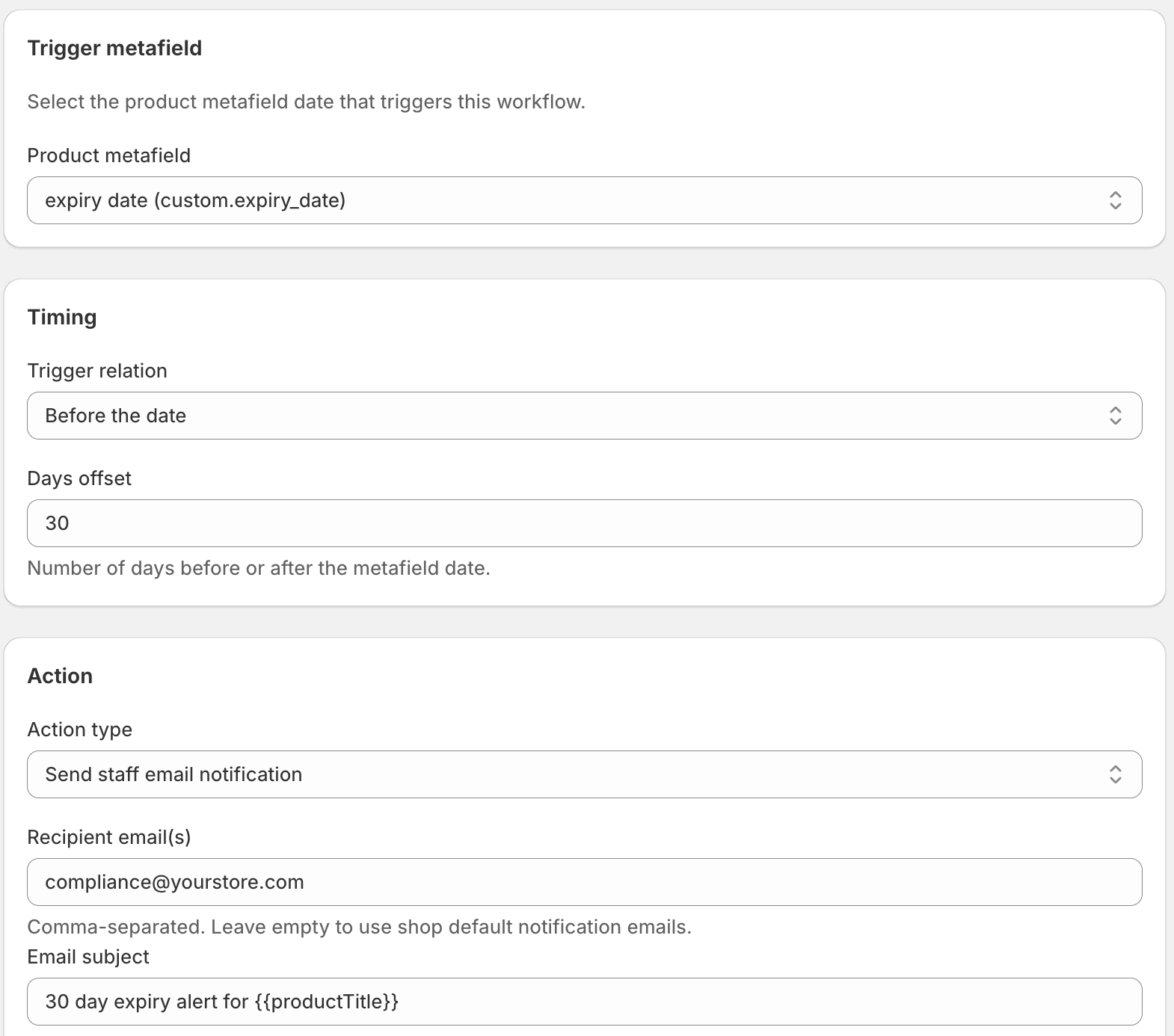
The email fires exactly 7 days before the launch date on the product's metafield. If the launch date changes, the alert adjusts accordingly, because DateCue always calculates relative to the current metafield value.
Can you stack alerts at different offsets?
Yes. You can run several pre-launch workflows off the same custom.launch_date metafield, each with its own offset and its own recipient. So one date drives a whole sequence: an early nudge to marketing, a closer check-in to the warehouse, then a launch-day note to everyone. A common three-step setup looks like this:
- 14 days before, email marketing to begin campaign prep
- 7 days before, email warehouse to check stock
- On the date, email everyone that the product is live
Each workflow fires independently at its configured offset. The launch day email workflow is covered in Auto-Email Your Team When a Shopify Product Launches, and the same pattern works in reverse if you'd rather email your team before a Shopify product expires. If you've tried building this in Shopify Flow and the date comparison wouldn't behave, our guide to why Flow date comparisons fail explains the catch.
Can you use a date metafield to alert staff before a class or event?
Yes. The same setup works if you sell courses, classes, workshops, or events. Store the date in a course_start or event_date metafield, then run staff workflows at the offsets you want, say 1 day before, on the day, and 1 day after. DateCue emails your instructors or ops team so they're ready for each session.
Say you run weekly pottery workshops as Shopify products. A workflow one day before the class date emails your instructor to prep the studio. Another on the day pings the front desk. The config is identical to the launch version: point at the event_date metafield, set the offset, choose the email-team action.
Here's the firm boundary, because it matters. DateCue emails your team, not your customers. It will not send the attendee a "your class is tomorrow" reminder. That's a customer-facing message, and it needs a customer email platform like Klaviyo or Shopify Email. Use DateCue for the staff side (get your people ready) and a marketing tool for the shopper side. Don't expect DateCue to remind the buyer.
How do you set a longer lead time for complex products?
Give each workflow a different offset and gate it with a product tag. Tag your complex products (say a bundle that needs more prep) as "high-prep" and add a tag filter to the 14-day workflow. Only those products get the extra-early alert. Everything else stays on the standard 7-day notice.
💡 What if the launch date is less than 7 days away? If you set the custom.launch_date metafield less than 7 days before the launch, the pre-alert trigger has already passed. DateCue won't fire it retroactively. The launch-day email (if you have one configured) will still fire on time. For time-sensitive additions, set the metafield at least 7 days in advance.
Frequently asked questions
Can I send different pre-launch emails to different people?
Yes. Create separate workflows for each recipient group. Each workflow has the same metafield and offset but different recipient addresses and email content. DateCue evaluates them independently, so each sends to its own list.
What if the launch date gets pushed back?
Update the custom.launch_date metafield on the product. DateCue will calculate 7 days before the new date. If the old alert has already fired, it won't fire again. If the new date is far enough out, the alert will fire 7 days before the updated date.
Will this fire for every product with a launch_date metafield?
Yes, unless you add a filter. If you only want pre-launch alerts for certain product types, add a tag filter to the workflow (e.g., "filter: tag includes 'notify-team'"). Products without that tag won't trigger the email even if they have the launch_date metafield set.
Can I include product details in the email body?
Yes. The email body can include the product title and a link to the product. Use the template fields in the workflow email action to include dynamic product information in the message.
Can I use a date metafield to trigger automated emails for a course or event?
Yes, for your staff. Store the date in a course_start or event_date metafield and run workflows 1 day before, on the day, and 1 day after. Each emails your instructors or ops team. DateCue cannot email the customer, so attendee reminders still need a tool like Klaviyo or Shopify Email.
Does DateCue send the launch or event reminder to my customers?
No. DateCue emails your team only, never your shoppers. It's built to alert warehouse, marketing, support, or instructors ahead of a launch or class. Customer-facing reminders are a marketing-email job, so pair DateCue with Klaviyo or Shopify Email for anything that reaches the buyer.
How much does DateCue cost?
DateCue is free forever for up to 100 product cues a month. Paid plans start at $9/month (Starter: 10,000 cues) and scale to $19/month (Scale: 100,000 cues, plus webhooks). All paid plans include a 14-day free trial.
A launch alert system that runs itself.
One alert is free. Stack 14-day, 7-day, and launch-day alerts on Starter ($9/mo).
Install free on ShopifyFree: 100 cues/month. Starter: 10,000 cues/month for $9/mo.