
Why Shopify Flow Can't Compare Dates (and What Actually Works)

If you've spent an afternoon trying to make Shopify Flow compare a metafield date to today's date, you're not doing it wrong. Flow genuinely can't do this cleanly, and the reasons why are worth understanding before you waste another hour on workarounds. This is the long answer, plus the short path around it.
What are you actually trying to do?
You want one simple thing: check a product's metafield date against today, then act when it passes. Move a product to draft when its expiry_date is reached, publish it on its launch_date, or tag it before a sale. Real stores need this, and Shopify Flow looks like it should handle it.
You want something that sounds simple. Check whether a product's expiry_date metafield has passed, and if so, move the product to draft. Or check whether today is a product's launch_date, and if so, publish it. Or fire a tag two weeks before a sale starts. These are the kinds of date-driven product rules that any sufficiently-real Shopify store eventually needs, and the kind that Shopify Flow looks like it should handle.
Except Flow doesn't work that way. There are three separate walls you'll hit. Most merchants hit all three before giving up.
Wall 1: Flow's condition fields don't accept Liquid
When you build a Shopify Flow condition, you compare a value against a fixed string. You can say "product tag equals on-sale", or "product status equals Active". What you can't say is "product metafield date is less than today", because "today" isn't a fixed value you can type. It changes every day.
The intuitive workaround is Liquid. You already use Liquid in your theme, you've seen Liquid in Flow's email actions, so you try the obvious thing:
{{ "now" | date: "%Y-%m-%d" }}And it doesn't work. Liquid is supported in Flow's action fields (the body of an email, the value passed to an HTTP request), but not in condition fields. The condition system treats your Liquid as a literal string. Your beautiful expression compares the characters {{ "now" | date: "%Y-%m-%d" }} against an actual ISO date, which will never match.
This catches almost everyone out, because the asymmetry isn't documented prominently. The product surface implies Liquid is a first-class citizen across Flow. It isn't.
Wall 2: You can't query products by metafield date through the API
The Shopify Admin API can't filter products by a metafield date value, so a scheduled Flow can't simply ask for "products that expired today". You might give up on Liquid and reach for a daily scheduled time trigger instead, but the query you need to run against it doesn't exist.
Here's why. The product query supports filtering by status, title, vendor, product type, tag, created/updated time, and a handful of other top-level fields. Metafield date comparison isn't in the list. There's no metafield:custom.expiry_date<today filter.
The official Shopify position is that metafields are flexible extension data, not indexed for cheap query. That's a reasonable architectural call. It's also the wall that turns a one-evening project into a much larger one.
Any scheduled Flow that wants to act on "products with a past expiry date" has to fetch every product, parse the metafield, and filter in code. Which brings us to wall three.
Wall 3: The Run Code workaround is fragile
Flow's "Run Code" action lets you write JavaScript inside an automation, so you can fetch products, parse the metafield date, and act on a match. It works, but you now own that code: pagination, missing metafields, malformed dates, rate limits, and API version bumps that break it silently. With enough effort you can build a flow that does this:
- Trigger on a daily schedule.
- Run Code fetches products in pages from the GraphQL Admin API.
- For each product, read the
custom.expiry_datemetafield. - Parse the ISO string to a date, compare it to the current time.
- For matches, fire a status change action.
It works. It's also a long way from the "no-code" promise of Flow.
You're maintaining JavaScript inside a Shopify automation. You handle pagination if your catalogue is larger than a single page. You handle missing metafields. You handle products with malformed dates because someone hand-edited a CSV. You handle API rate limits when your catalogue grows. If Shopify deprecates a field on the next API version bump, your flow might fail silently and you'll only notice the next time a product doesn't archive on time.
For a developer comfortable with that maintenance, it's fine. For a merchant who just wanted a product to draft itself when it expired, this is genuinely too much. And every conversation I have with merchants who tried it ends the same way: they built it, it worked for a quarter, then something quietly broke and they didn't notice for three weeks.
💡 To be fair to Flow: it's a genuinely powerful tool for order automation, customer segmentation, inventory alerts, and post-purchase journeys. It's not designed for scheduled, date-driven product automation. Trying to make it do that job is fighting the grain of how it's built. That's not Flow's fault, and it isn't yours.
What actually works: a tool built for the job
The model is straightforward: you put a date in a product metafield, DateCue watches it, and when the date is due it fires the action you configured. Add a tag, remove a tag, set the product status, email your team, or fire a webhook on the Scale plan. It reads the date and acts the moment it's due, with nothing for you to maintain.
DateCue exists because I kept running into this exact wall and got tired of recommending Run Code to merchants who didn't deserve it.
No Liquid. No JavaScript. No API pagination logic. Three fields and a save button.
Here's the expiry workflow that would've taken hours to build in Flow:
Timing: After the date (0 days)
Action: Change product status → Draft
Filter: Status = Active
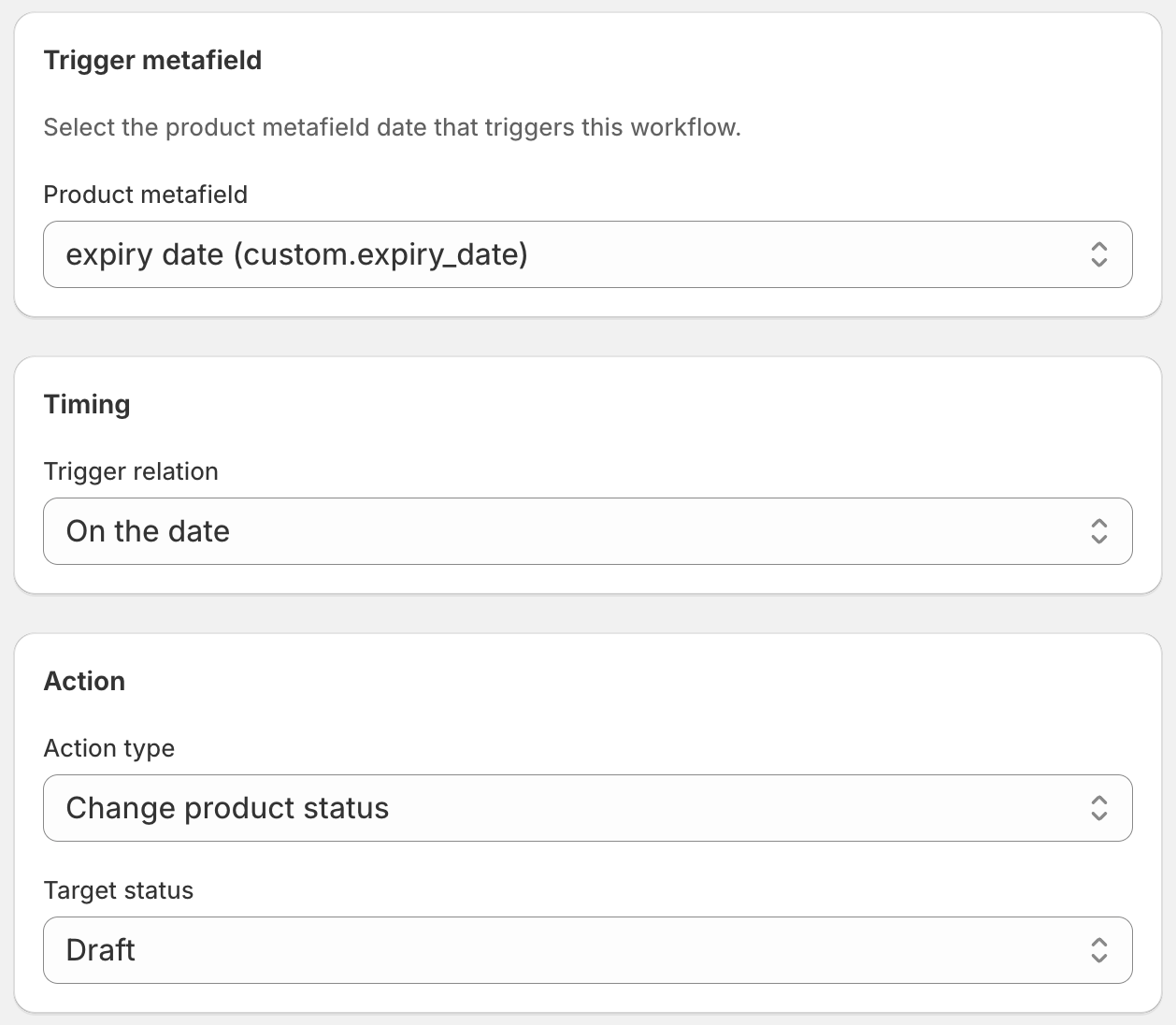
DateCue picks up every product with a custom.expiry_date metafield, tracks the date, and moves it to draft within a minute of the date passing. The Active status filter is the guardrail that makes sure DateCue only touches products that are currently live, so it won't re-touch products you've already drafted manually for other reasons. The full walkthrough lives in the DateCue setup guide.
How fast is "within a minute," really?
Two clocks run. The action executor checks for due workflows every minute, and the product sync that pulls fresh metafield values from Shopify runs every five minutes. So if you set a metafield to a past date right now, DateCue reads the new value on the next sync and fires the action on the next minute tick.
If you need a brand-new value picked up faster (say, you're updating a launch date sixty seconds before it fires), hit Sync Now in the dashboard. The metafield is loaded immediately and the action fires on the next minute tick.
For any date set in advance (which is almost all real-world use), the action fires within the same minute that the date passes. Set a launch for 10:00am, the product is live by 10:01. That's the same outcome Shopify's future publishing gives you for a single product, except DateCue drives it from a metafield date across your whole catalogue and handles unpublishing too.
What else can date-driven automation handle?
Comparing a metafield date to today is the one primitive Flow can't manage, and it's exactly what unlocks most date-driven product rules. Once you have it, the same three-field model covers publishing, hiding, tagging, and emailing on a schedule. The use cases stack from a single capability:
- Auto-publish a product on its launch date by reading a
launch_datemetafield. - Publish and hide seasonal products at the start and end of a window.
- Auto-hide products on their expiry date so out-of-date stock never lingers on the storefront.
- Tag products as "expires soon" two weeks before they expire to feed a clearance automated collection.
- Keep a New Arrivals collection always fresh by tagging and untagging on a rolling date.
- Email your buyer 30 days before stock expires so they have time to reorder.
- End a sale automatically by removing the on-sale tag on the end date.
Each one is a single workflow in DateCue with different timing and action. The things that are genuinely difficult in Flow (date math, scheduled queries, metafield comparisons) are exactly what DateCue handles natively.
Do you still need Flow?
Almost certainly yes, and that's fine. Flow is excellent at the things it was designed for. Tagging high-value orders, fraud screening, post-purchase customer journeys, low-stock alerts to your warehouse, anything triggered by an order event or a customer event. Flow handles all of that well, and DateCue doesn't try to.
The split is clean. Flow handles events that fire from the order or customer side. DateCue handles events that fire from a date on a product. They coexist without any integration, because they don't compete for the same triggers.
How do you migrate from a Run Code workflow?
If you already run a Run Code workflow for date-based product automation, the move is short. Recreate the same action in a DateCue workflow, disable the Flow version without deleting it, then watch DateCue's execution log for a week before retiring the old code. Most migrations take under an hour. The pattern below works well:
- Install DateCue from the Shopify App Store. The free plan is enough to test with.
- Recreate the action in a DateCue workflow: pick the metafield, the timing, and the action.
- Disable the Run Code workflow in Flow (don't delete it yet).
- Watch DateCue's execution log for a week. Every fired action appears with the product, the date that triggered it, and the result.
- Once you've confirmed DateCue is doing the job, delete the old Run Code workflow.
Most migrations take less than an hour. The slow part is verification, not setup.
Frequently asked questions
Why can't Shopify Flow compare dates natively?
Flow's condition fields evaluate at trigger time and only accept static values. Date math needs a dynamic "today" that changes on every check. Liquid works in Flow's action fields but not in condition fields, so you can't drop in a Liquid expression to compute today's date and have Flow honour it. The trigger system also doesn't support scheduled queries that filter by metafield date.
Is the Run Code workaround in Flow actually reliable?
It can work, but it requires ongoing maintenance. You're writing JavaScript inside Flow that fetches products, handles pagination for large catalogues, parses metafield date strings, and falls back gracefully when the metafield is missing. If Shopify's API contracts change you may not notice until a launch quietly fails. It's viable for a developer who's prepared to own it. It's overbuilt for most merchants.
Do I still need Shopify Flow if I use DateCue?
Probably yes. Flow is excellent for order tagging, customer journeys, inventory alerts, and fraud workflows. DateCue replaces Flow only for date-triggered product automation: status changes, tag changes, and staff emails fired off product metafield dates. The two tools sit side by side without conflict.
What metafield types does DateCue support?
Both the date and date_time metafield types on products, in any namespace and key. If you can edit the value in Shopify's metafield editor, DateCue can watch it.
How fast does DateCue act once a date passes?
DateCue executes due actions every minute. New metafield values from Shopify are detected within a 5-minute sync window. If you've just changed a launch date and you need it picked up immediately, hit Sync Now in the dashboard and the new value is loaded right away.
How much does DateCue cost?
DateCue is free forever for up to 100 product cues a month. Paid plans start at $9/month (Starter: 10,000 cues) and scale to $19/month (Scale: 100,000 cues, plus webhooks). All paid plans include a 14-day free trial.
Can DateCue replace a Flow Run Code workflow I already built?
In most cases, yes. If your Run Code workflow is doing the standard pattern (fetch products, compare metafield dates, change status or tags), a DateCue workflow does the same thing in three fields. Keep the Flow workflow archived rather than deleted for a week or two while you verify DateCue is behaving as expected, then retire it.

Matt Burrell
Founder of Ripen Studio. I built DateCue because I kept running into this exact wall and got tired of recommending Run Code to merchants who didn't deserve it. More about Matt.
Skip the Flow workarounds. Free forever.
One workflow, fifty products, no card required. Set up your first date-driven automation in five minutes.
Install free on ShopifyFree plan: 100 cues/month. Upgrade only if you outgrow it.