
How to Schedule a Shopify Product to Go Live on Launch Day

It's 11:58pm and you're sitting at your laptop, watching the clock, waiting to click Publish. Every merchant who does product drops knows this feeling. There's a better way.
Why can't Shopify schedule a product to publish?
Shopify has no native button to flip a product from Draft to Active at a set date and time. You've built the hype, the email went out, your audience is ready, and you're still the one who has to stay up and click Publish by hand. That gap is exactly what catches most merchants out.
Some merchants use Shopify's future publishing to schedule visibility through specific sales channels. It works, sort of, but it's limited to channel availability, not the underlying product status. If you want the product truly live (Active) at a precise moment, that still needs a manual click or some kind of automation.
DateCue handles this with a single metafield and one workflow.
How do you set up a launch date metafield?
Create a date metafield on your products so DateCue knows when each one should go live. In Shopify admin you add a single metafield definition called Launch Date, then fill in the value on each product. It takes about a minute and you only define it once.
To add the definition, go to Settings → Custom data → Products:
- Name: Launch Date
- Namespace and key:
custom.launch_date - Type: Date and time (use this rather than plain Date if you want to specify a launch hour, not just a day)
Set the product status to Draft. Fill in the launch date and time. That's all the product prep required. DateCue handles the rest.
What does the publish workflow look like?
One workflow watches the launch date metafield and changes the product status to Active on the date it falls due. You point it at custom.launch_date, set the timing to "on the date", and choose the set status action. A Draft filter keeps it from touching products that are already live.
Timing: On the date
Action: Change product status → Active
Filter: Status = Draft
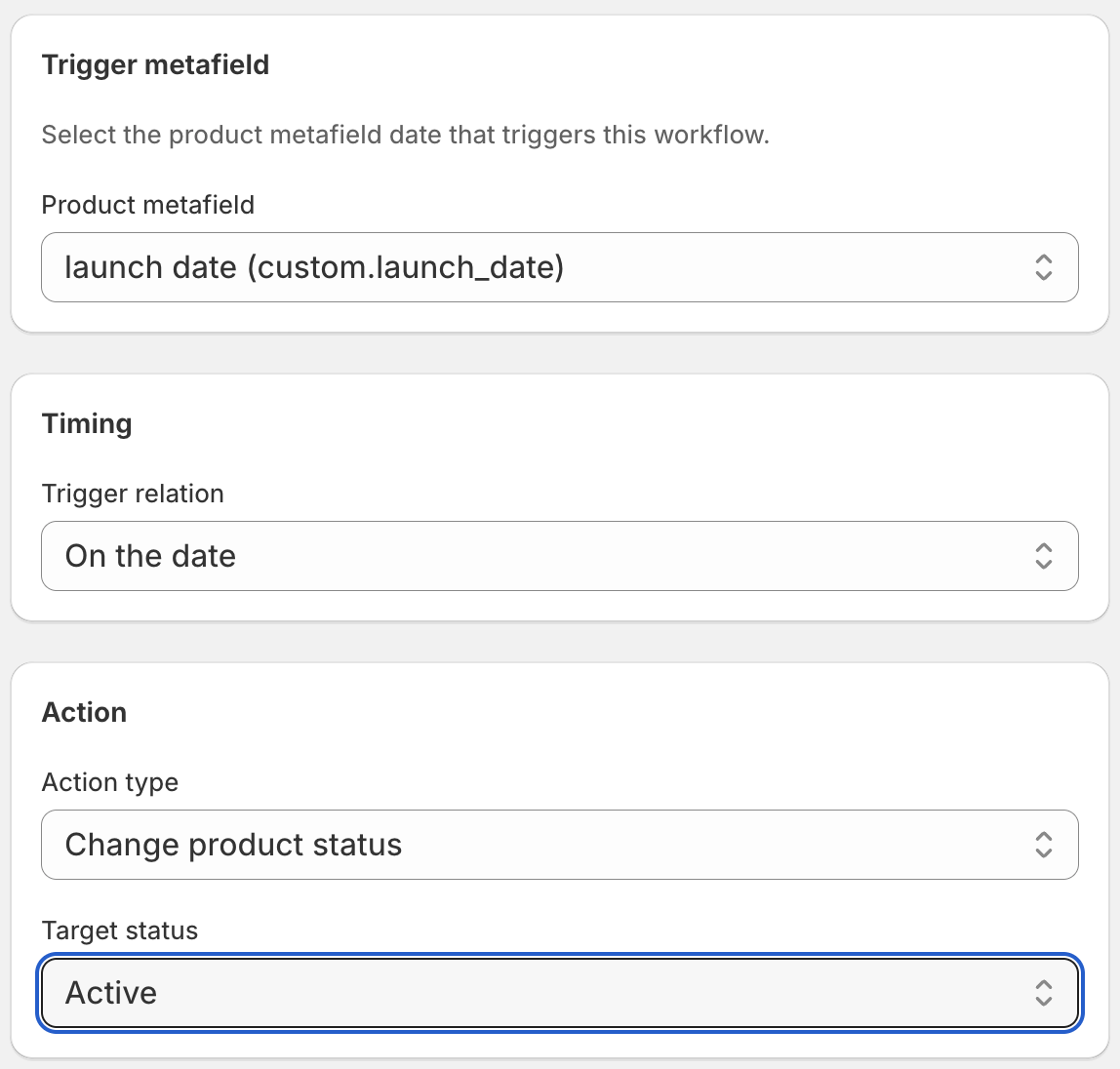
The Draft status filter is important. It means DateCue only publishes products that are sitting in Draft waiting to go live. If a product with a launch_date metafield is already Active (say, you published it manually early), the workflow skips it. No double-firing, no unexpected behaviour.
How precise is the timing?
DateCue checks for due actions every minute, so a launch set for 10:00am goes live between 10:00 and 10:01. That's tighter than Shopify Flow's scheduled-time trigger, which runs on a coarser interval. New metafield values are picked up on a 5-minute sync, so for a last-minute change, hit Sync Now in the dashboard.
If you use the plain date type rather than date_time, DateCue treats the launch as occurring at the start of that day (midnight). Use date_time if you want a specific hour.
Can one workflow publish a whole collection at once?
Yes. One workflow covers every product that has the metafield set, so there's no per-product setup. If you have 10 products going live on the same day at the same time, put custom.launch_date on all of them, leave them in Draft, and the single workflow publishes every one when the date arrives.
Combine it with a new arrivals tag
A natural companion to this workflow tags newly published products as "new arrivals" the moment they go live, so they drop straight into a Shopify automated collection. You can run a second workflow on the same metafield to add a "new-arrival" tag on the launch date, and a third to remove it 30 days later.
For pre-order products that flip from pre-order to live on a release date, there's a dedicated guide on how to flip pre-orders to live automatically. If your drops follow the calendar, the same idea covers publishing seasonal products on schedule. And if you've already tried wiring this up in Flow, read why Flow's date comparisons fall short for product dates. New to all of it? Start with the DateCue product guide.
💡 Changed your launch date? Just update the metafield value on the product. DateCue picks up the change on the next sync and reschedules accordingly. The old scheduled action is cancelled automatically.
Frequently asked questions
How precisely does DateCue hit the launch time?
DateCue runs its check every minute, so your product goes live within about 60 seconds of the scheduled date and time. It won't be exact to the second, but it'll be within a minute, accurate enough for any real-world launch.
What if I want to publish at a specific time, not just a date?
Use the date_time metafield type instead of plain date. This lets you set an exact hour and minute for the launch. The date-only type fires at the start of the day (midnight).
Can I schedule multiple products for the same launch date?
Yes. One workflow applies to all products that have the metafield set. Put 5, 50, or 500 products in Draft with the same custom.launch_date value and they'll all go live when the date arrives.
What happens if I change the launch date after setting up the workflow?
DateCue syncs product metafield data regularly. If you update the launch date, it reschedules the action to the new date automatically. The previous scheduled action is cancelled and replaced.
How much does DateCue cost?
DateCue is free forever for up to 100 product cues a month. Paid plans start at $9/month (Starter: 10,000 cues) and scale to $19/month (Scale: 100,000 cues, plus webhooks). All paid plans include a 14-day free trial.
Sleep through your next launch.
Set the date. DateCue handles the publish while you're not watching.
Install free on ShopifyFree forever: 100 cues/month. No card required.