
Auto-Email Your Team When a Shopify Product Launches
When a Shopify product launches, three teams usually need to know: warehouse (to prep fulfillment), marketing (to push the announcement), and support (to handle incoming questions). Here's how to email your team automatically the moment the product goes live, without a single Slack message or calendar event.
Why does launch day communication fail?
Launch day coordination usually runs on calendar reminders, Slack threads, and hope. Someone forgets to tell someone, the warehouse isn't ready, or marketing fires the campaign before the product is live. An automated email sent the exact moment the product goes live removes that guesswork, because the system, not a person, raises the alert.
Step 1: Set up your launch date metafield
DateCue reads the launch date from a product metafield, so you set one up first. In your Shopify admin, open Settings → Custom data → Products and create a date field. Set it on each product before launch, and the email action has a date to watch and fire against.
Create the definition with these values:
- Namespace and key:
custom.launch_date - Type: Date or Date and time
Set this on products before their launch. DateCue monitors the metafield and fires the email action when the date arrives.
Step 2: Build the DateCue email workflow
Now you point DateCue at that metafield and tell it what to do. The workflow has three parts: the metafield to watch, the timing (on the launch date), and the action (send email). Add your team's addresses as recipients, write a subject line, and DateCue handles the rest when the date lands.
Timing: On the date
Action: Send email
To: warehouse@yourstore.com, marketing@yourstore.com, support@yourstore.com
Subject: Product live: [Product name]
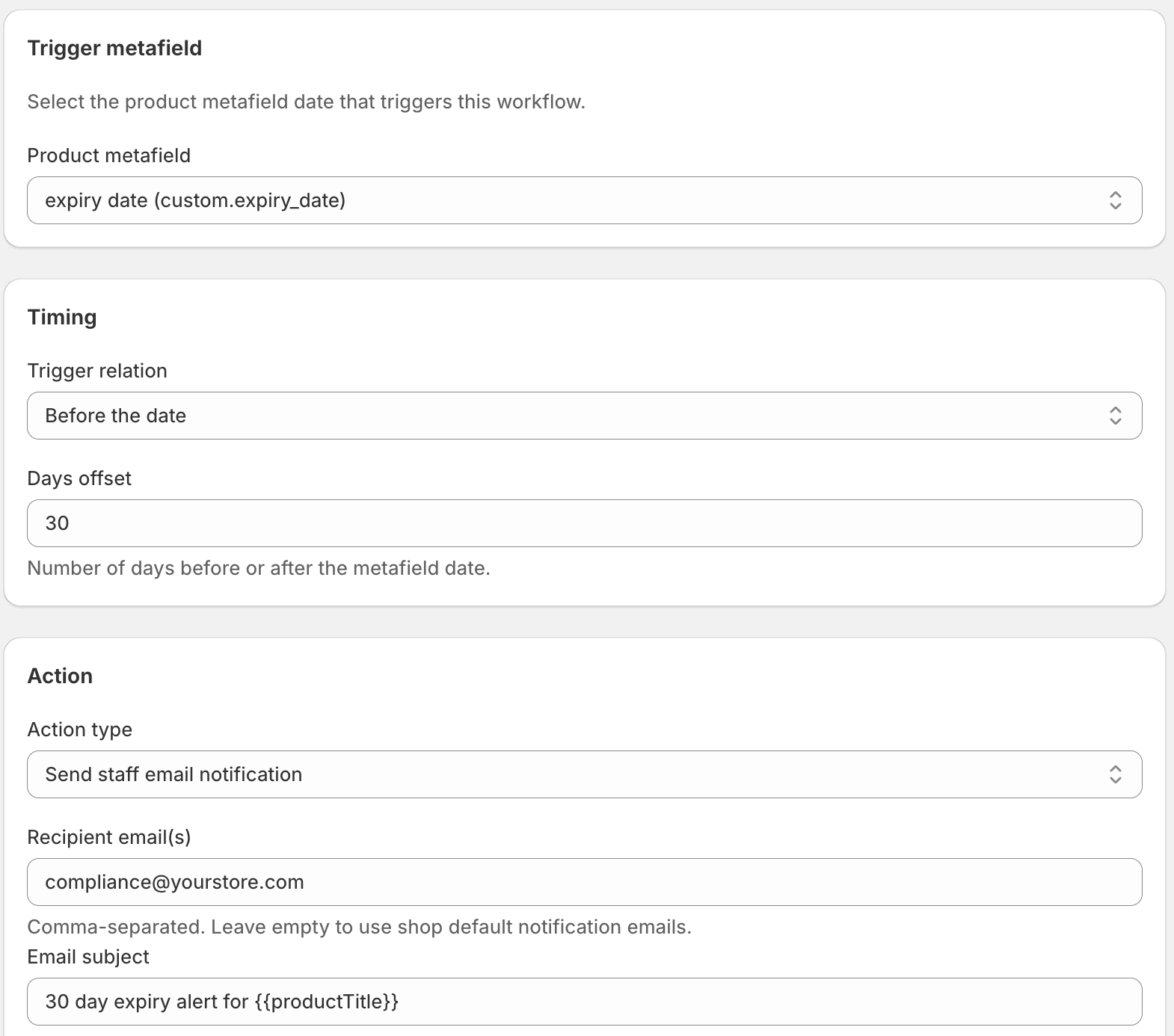
The email fires when the launch date arrives. It includes the product name and a link to the product in your Shopify admin, so recipients can jump straight to what they need.
Can I publish the product and email the team together?
Yes, with two workflows on the same date. If you keep products in draft until launch, run a second workflow that flips the product status to active. Each DateCue workflow fires one action, so "publish and notify" is two workflows that both trigger on the launch date:
Timing: On the date
Action: Set status → Active
Filter: Status = Draft
The product publishes and the team email fires on the same minute. Shopify's own future publishing can schedule the go-live, but it won't tell anyone it happened, which is the gap these two workflows close. Full walkthrough of the publish-on-launch workflow: Schedule a Shopify Product to Go Live on Launch Day.
How do I send different emails to different teams?
Create one workflow per team, each with its own recipients and message. Warehouse needs SKU and quantity, marketing needs the product URL, support needs the key product details, so the content differs. All three can watch the same custom.launch_date metafield, and DateCue evaluates each workflow independently when the date arrives.
You can build similar fan-out alerts in Shopify Flow, but Flow struggles to compare a stored date against today, which is exactly where most launch automations break. If you've hit that wall, here's why it happens and how to work around it: Shopify Flow date comparison not working.
💡 Give marketing a head start: Combine this workflow with the 7-day pre-launch alert. Marketing gets an email 7 days before to prepare the campaign, and another email on launch day as the signal to fire. Warehouse gets only the launch-day email since their prep can happen faster. New to date-driven workflows? Start with the DateCue product guide.
Frequently asked questions
Can I send to multiple email addresses?
Yes. Add multiple recipients in the email action. Each address receives the same email. If different people need different content, create separate email action workflows with different recipients and message templates.
What information is included in the launch email?
The email includes the product name, the triggering date, and a link to the product in your Shopify admin. You can customise the subject line and message body in the workflow configuration.
Can the email go to a Slack channel instead?
DateCue sends emails directly. If your team lives in Slack, set up a dedicated email address that forwards to a Slack channel (Slack's email integration does this) and use that address as the recipient in DateCue. For a richer alert, route the launch through Slack's incoming webhooks using the Scale plan's webhook action.
Will this work for products that launch at a specific time of day?
Yes. Use a Date and time metafield instead of a plain Date. Set the exact launch time and DateCue will fire the email workflow within a minute of that moment.
How much does DateCue cost?
DateCue is free forever for up to 100 product cues a month. Paid plans start at $9/month (Starter: 10,000 cues) and scale to $19/month (Scale: 100,000 cues, plus webhooks). All paid plans include a 14-day free trial.
Email the right people at the right moment.
Set up your first launch alert in five minutes. Free forever for one workflow.
Install free on ShopifyFree: 100 cues/month. No card required.