
Publish Shopify Seasonal Products on the Right Day, Every Year

If your store sells Christmas decorations, summer apparel, or anything that's only relevant for part of the year, this is how you publish Shopify seasonal products automatically. Two workflows save you two rounds of manual publishing and hiding every year, and make sure you never forget to do it.
Why is managing seasonal products by hand so painful?
Seasonal products need to appear when the season starts and disappear when it ends. Doing that by hand means a calendar reminder twice a year to publish and then re-draft each product. Miss the window, and items either aren't live when they should be, or linger looking irrelevant in front of shoppers.
DateCue handles both transitions with two date metafields and two workflows. Set the dates once, and DateCue does the publishing and drafting for you, year after year (after you refresh the dates each year). The only built-in alternative, Shopify's own future publishing, schedules a single go-live but can't draft a product again once the season ends.
Step 1: Create the season metafields
You need two date metafields so each product carries its own start and end. In your Shopify admin, open Settings, then Custom data, then Products, and add a metafield called custom.season_start and another called custom.season_end, both with the type Date. These two dates drive everything that follows.
- Namespace and key:
custom.season_start(Type: Date) - Namespace and key:
custom.season_end(Type: Date)
Set both on each seasonal product, then keep the products in Draft status between seasons. If you want a refresher on scheduling a single go-live date first, my walkthrough on how to schedule a Shopify product publish date covers the basics.
Step 2: The two DateCue workflows
You build two workflows, one for each transition. The first watches custom.season_start and sets the product status to Active on that date. The second watches custom.season_end and sets the status back to Draft. Between them they cover the whole appear-and-disappear cycle without you touching a thing.
Workflow 1, publish at season start:
Timing: On the date
Action: Set status → Active
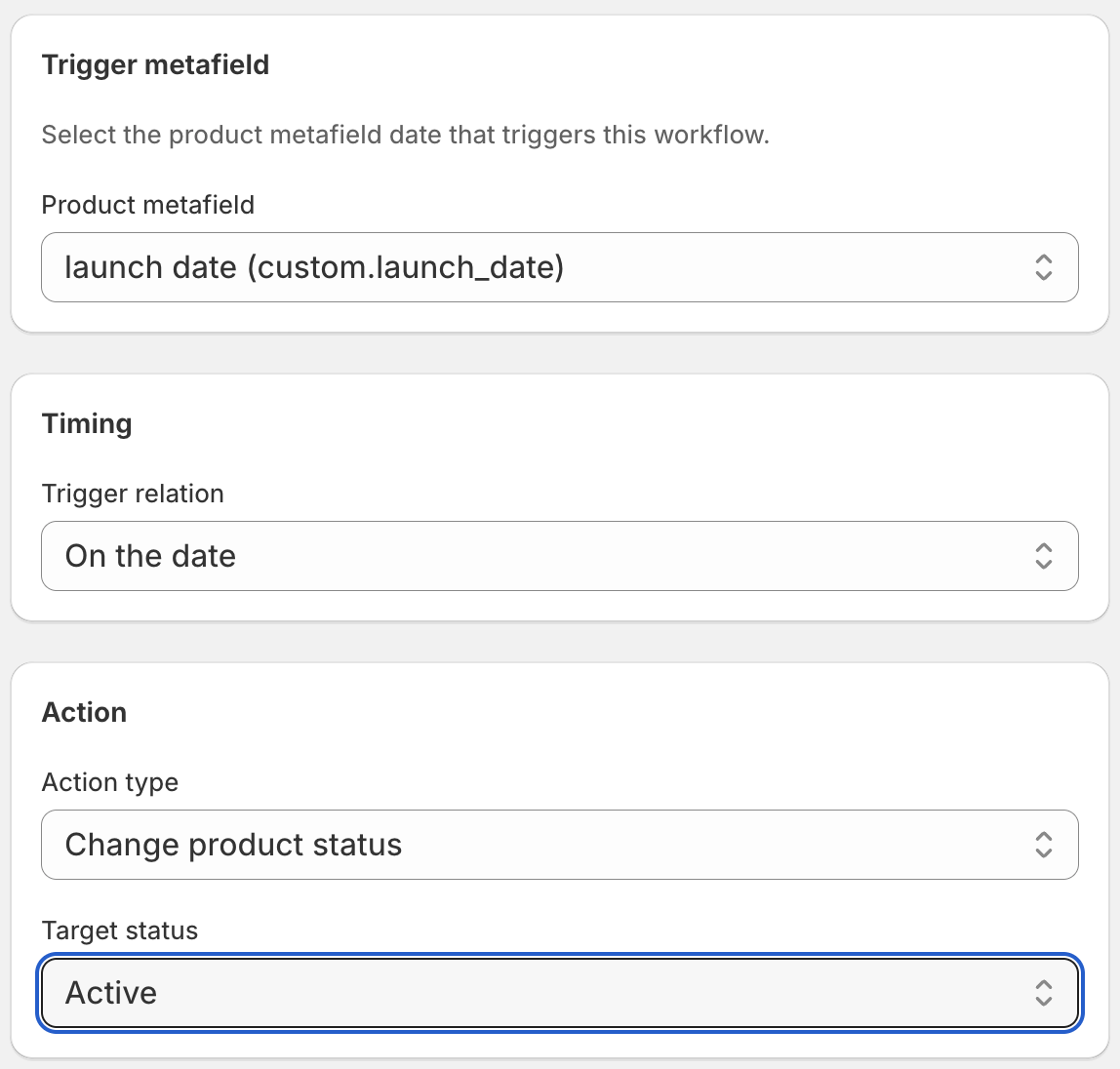
Workflow 2, draft at season end:
Timing: On the date
Action: Set status → Draft
Your seasonal products sit in draft until the season starts, go live automatically, and return to draft when the season ends. Your customers only see them when they're relevant.
How do I keep a seasonal smart collection in sync too?
If a "Christmas" or "Summer" smart collection is built from product tags, add a tag action to each workflow so membership tracks the status change. Add the season tag when the product goes Active, and remove it when the product returns to Draft.
- Season start: Set status to Active, plus Add tag christmas
- Season end: Set status to Draft, plus Remove tag christmas
Now the product status and the collection membership stay in sync at the same moment. If you've ever tried to do this date comparison in Shopify Flow and watched it quietly fail, my write-up on why Shopify Flow date comparisons don't work explains the gap DateCue fills.
How do I roll the dates over for next year?
After each season ends, point custom.season_start and custom.season_end at next year's dates. The fastest way is Shopify's bulk editor: filter your products by a "seasonal" tag, bulk edit both metafields in one pass, and you're set for the whole next cycle in a couple of minutes.
This same date-driven pattern works for one-off launches too. If you're releasing a single product on a fixed day rather than a recurring season, my guide to auto-publishing a pre-order on its release date uses the same metafield approach.
💡 Seasons that span the new year: If your season runs from November to January (like Christmas), the start and end dates fall in two different years. That's fine. Just set custom.season_start to 1 November and custom.season_end to 15 January of the following year. DateCue evaluates absolute dates, so year boundaries aren't a problem.
Frequently asked questions
Can I use this for monthly or weekly cycles, not just annual seasons?
Yes. The metafield is just a date. If you rotate products monthly or for specific events, set the start and end dates accordingly. The workflow logic is identical regardless of how long the active window is.
What if the season hasn't started yet and I'm still setting up?
Set the metafields with future dates and keep products in draft. DateCue will wait until the start date arrives. You can set everything up months in advance.
Can I filter these workflows to only affect specific products?
Yes. Add a tag filter to each workflow. For example, filter by "seasonal" or "christmas" to ensure the workflows only fire on products with that tag, ignoring everything else in your catalogue. This is useful if you have a mixed catalogue and want precise targeting.
What if I want some seasonal products to stay active longer than others?
Set different custom.season_end dates on each product. DateCue evaluates each product independently, so some can end on January 1st while others run until January 31st, whatever makes sense for each item.
How much does DateCue cost?
DateCue is free forever for up to 100 product cues a month. Paid plans start at $9/month (Starter: 10,000 cues) and scale to $19/month (Scale: 100,000 cues, plus webhooks). All paid plans include a 14-day free trial.
One date entry. Every season, sorted.
Try the season-start workflow free, then unlock the season-end on Starter.
Install free on ShopifyFree: 100 cues/month. Starter: 10,000 cues/month for $9/mo.