
Flip Shopify Pre-Orders to Live on Release Day

Pre-orders are a great tool, but they create a manual task at exactly the wrong moment. When release day arrives, you're supposed to be celebrating. Instead you're logging into Shopify to publish a product by hand. Here's how to auto-publish Shopify pre-orders to live on the release date, so the whole transition runs itself.
What happens when a pre-order goes live?
When a pre-order goes live, the product should drop its pre-order label, slip into your regular collections, and become fully purchasable. A standard setup keeps the product published so customers can find and buy it, with the "Pre-Order" badge driven by a product tag. On release day, three things should happen:
- The product becomes fully available (if it wasn't already)
- The "pre-order" tag is removed (the badge disappears)
- The product appears in your regular collections
DateCue automates steps 2 and 3, and optionally step 1 (the move from draft to active product status) if you keep the product hidden during pre-order.
Active pre-order or draft pre-order: which fits you?
You have two clean ways to run a pre-order. Keep the product active so shoppers can buy it now with a "Pre-Order" badge, then remove that tag on release day. Or keep it in draft, hidden from search, and flip it to active on the release date. The active route is simpler; the draft route gives you tighter control over the reveal.
Approach A, product is active during pre-order (most common): the product is published so customers can find it and buy it as a pre-order. The "pre-order" tag drives the badge and keeps it in a Pre-Orders automated collection. On release day, you just remove the tag: the badge goes, the product moves to regular collections.
Approach B, product is in draft during pre-order: the product isn't searchable. It's only accessible via direct link. On release day, it publishes to active and the "pre-order" tag is removed at the same time. Use this if you want to control exactly when the product appears in search and navigation. It's the same logic you'd use to schedule a Shopify product publish date for any timed launch.
How do you set up the release date metafield?
You set up the release date as a product metafield so each product carries its own go-live moment. In your Shopify admin, go to Settings → Custom data → Products and create one definition. DateCue reads this value on every product and fires when the date is due. Here's the exact config:
- Namespace and key:
custom.release_date - Type: Date and time (recommended for precise release timing)
The DateCue workflows
Each DateCue workflow watches the release date metafield and fires one action when it's due. Approach A needs a single workflow that removes the pre-order tag. Approach B needs two: one to set the status to active, one to remove the tag. They run on the same minute, so the switch looks instant to a shopper.
For Approach A, remove the pre-order tag only:
Timing: On the date
Action: Remove tag → pre-order
Filter: Tag includes: pre-order
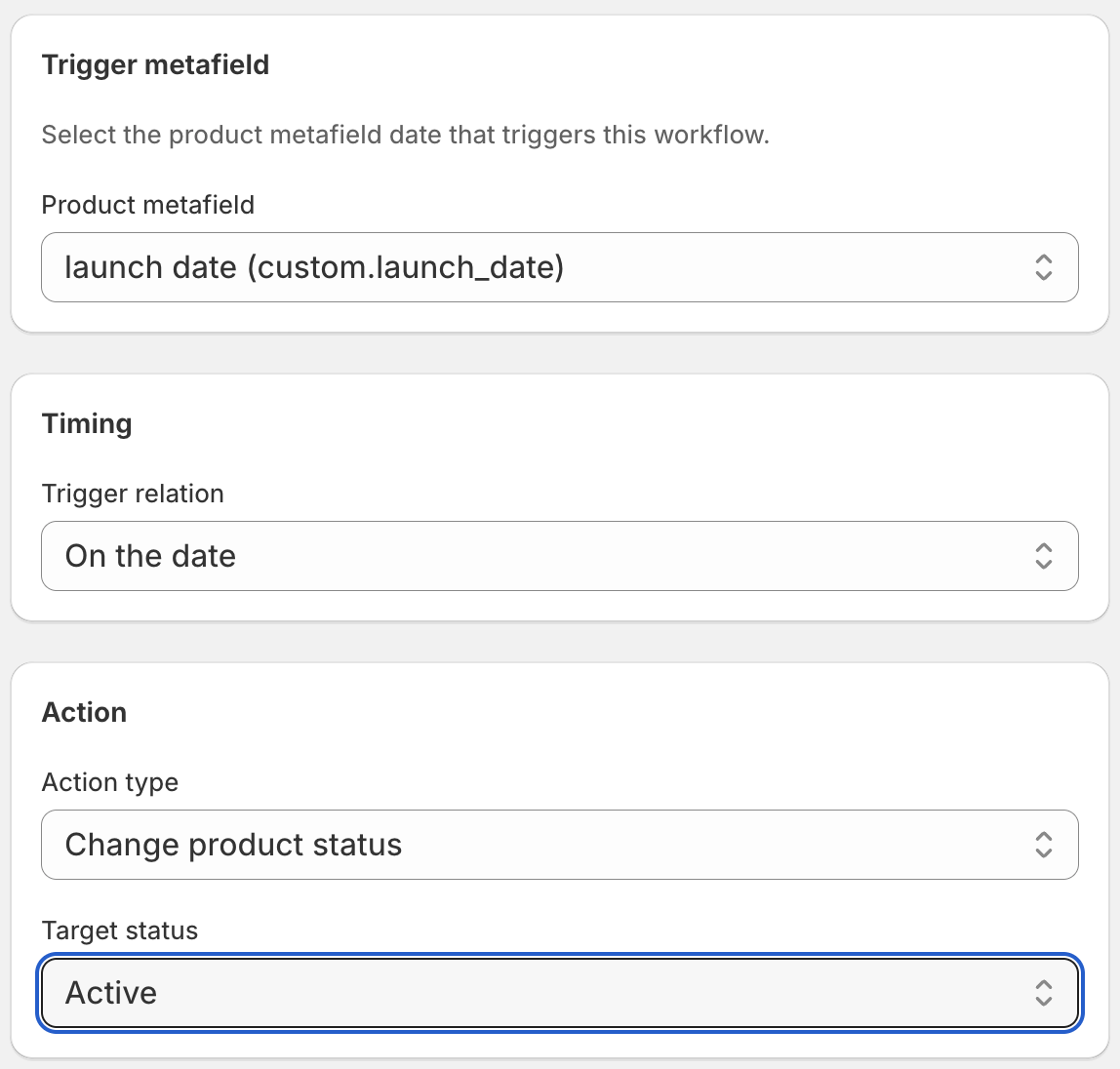
For Approach B, publish and remove the tag (two workflows):
Each DateCue workflow fires one action, so Approach B is two workflows on the same metafield. They fire on the same minute, so the result looks atomic to a customer.
Timing: On the date
Action: Set status → Active
Filter: Status = Draft
Timing: On the date
Action: Remove tag → pre-order
Filter: Tag includes: pre-order
The workflows fire on the same minute the release date arrives. The product transitions cleanly: the badge disappears, the product enters your regular collections, and your New Arrivals workflow (if you have one set up) can add a "new-arrival" tag at the same moment. This is the same date-driven pattern behind making Shopify seasonal products publish automatically.
Can you add a new-arrival tag on release day too?
Yes, and it's worth doing, because release day is a product's launch day. Add a third workflow on the same release date metafield with Add tag, new-arrival. The product slides straight from the Pre-Orders collection into New Arrivals the moment the pre-order tag disappears. That's three workflows on one metafield, which is exactly what Starter ($9/mo) is built for.
💡 Pre-order badge setup: Most Shopify themes display custom badges when a product has a specific tag. Check your theme's documentation for the tag name that triggers a "Pre-Order" badge: it might be "pre-order", "preorder", or something else. Use that exact tag name in your DateCue remove action. If you've ever wrestled with Shopify Flow date comparisons not working, this is the tidier route.
Frequently asked questions
Can I set different release times for different products?
Yes. Each product has its own custom.release_date metafield. Set whatever date and time is correct for each product and DateCue evaluates them individually. Products don't all need to release at the same time.
What if the release date changes?
Update the metafield value on the product. DateCue reads the current metafield value on each check cycle, so it will fire against the updated date. If the new date hasn't passed yet, the workflow simply hasn't triggered yet.
Does this work with Shopify's built-in pre-order functionality?
DateCue works with tags and product status, which is separate from Shopify's native pre-order purchase option. If you're using a third-party pre-order app that relies on tags, DateCue can remove the tag on release day to deactivate the pre-order state, but check your specific app's documentation for which tag it uses.
Will setting status to Active affect product variants?
Setting a product to Active changes its overall visibility, so all variants become purchasable. It doesn't change individual variant availability or inventory levels.
How much does DateCue cost?
DateCue is free forever for up to 100 product cues a month. Paid plans start at $9/month (Starter: 10,000 cues) and scale to $19/month (Scale: 100,000 cues, plus webhooks). All paid plans include a 14-day free trial.
Let release day handle itself.
Install free and prove out Approach A on one workflow. Upgrade to Starter when you're ready for the full transition.
Install free on ShopifyFree: 100 cues/month. Starter: 10,000 cues/month for $9/mo.