
Keep Your Shopify New Arrivals Collection Always Fresh

Most "New Arrivals" collections are a lie. Products from months ago sit right alongside this week's releases because nobody remembered to pull them. What you actually want is a New Arrivals collection, driven by metafields, that shows products added in the last 30 or 60 days and quietly drops the rest. Here's a two-workflow system that keeps your Shopify New Arrivals collection honest, automatically: DateCue adds a tag on launch day and removes it when the product is no longer new.
The problem with manual New Arrivals management
Keeping a New Arrivals collection accurate requires two actions for every product: add it when it launches, remove it when it's no longer new. In practice, the adding happens (sometimes) and the removing almost never does. The result is a collection that becomes meaningless over time.
The fix is to automate both actions with date-based triggers. DateCue does exactly this using a launch date metafield on each product.
How does the automated New Arrivals system work?
The whole thing runs on one product metafield called custom.launch_date. Two DateCue workflows watch that date: one adds a "new-arrival" tag when the launch date arrives, and a second removes it 30 days later. A smart collection then keeps itself in sync with that tag. Here's the split:
- Workflow 1: When the launch date arrives → add tag "new-arrival"
- Workflow 2: 30 days after the launch date → remove tag "new-arrival"
Shopify's automated (smart) collection rule picks up any product tagged "new-arrival" and drops products that lose the tag. Your collection stays accurate and current without you lifting a finger.
Step 1: Create the launch date metafield
The launch date metafield is the single field everything keys off, so set it up first. In your Shopify admin go to Settings → Custom data → Products and add a new definition. Give it the namespace and key custom.launch_date and pick a Date type. Here are the exact values:
- Namespace and key:
custom.launch_date - Type: Date or Date and time
Set this on every product you want to rotate through New Arrivals.
Step 2: Create the smart collection
Now build the collection that reads the tag. Go to Products → Collections → Create collection, set the type to Automated, and add one rule: Product tag → is equal to → new-arrival. Save it. From here the collection self-populates as products gain or lose that product tag, so you never edit it by hand.
Step 3: Build the two DateCue workflows
This is where the metafield turns into action. You'll create two workflows in DateCue, both reading custom.launch_date. The first adds the "new-arrival" tag on the launch date itself. The second removes that same tag 30 days later. Each one is three fields: metafield, timing, action. Here they are.
Workflow 1, add the tag on launch:
Timing: On the date
Action: Add tag → new-arrival
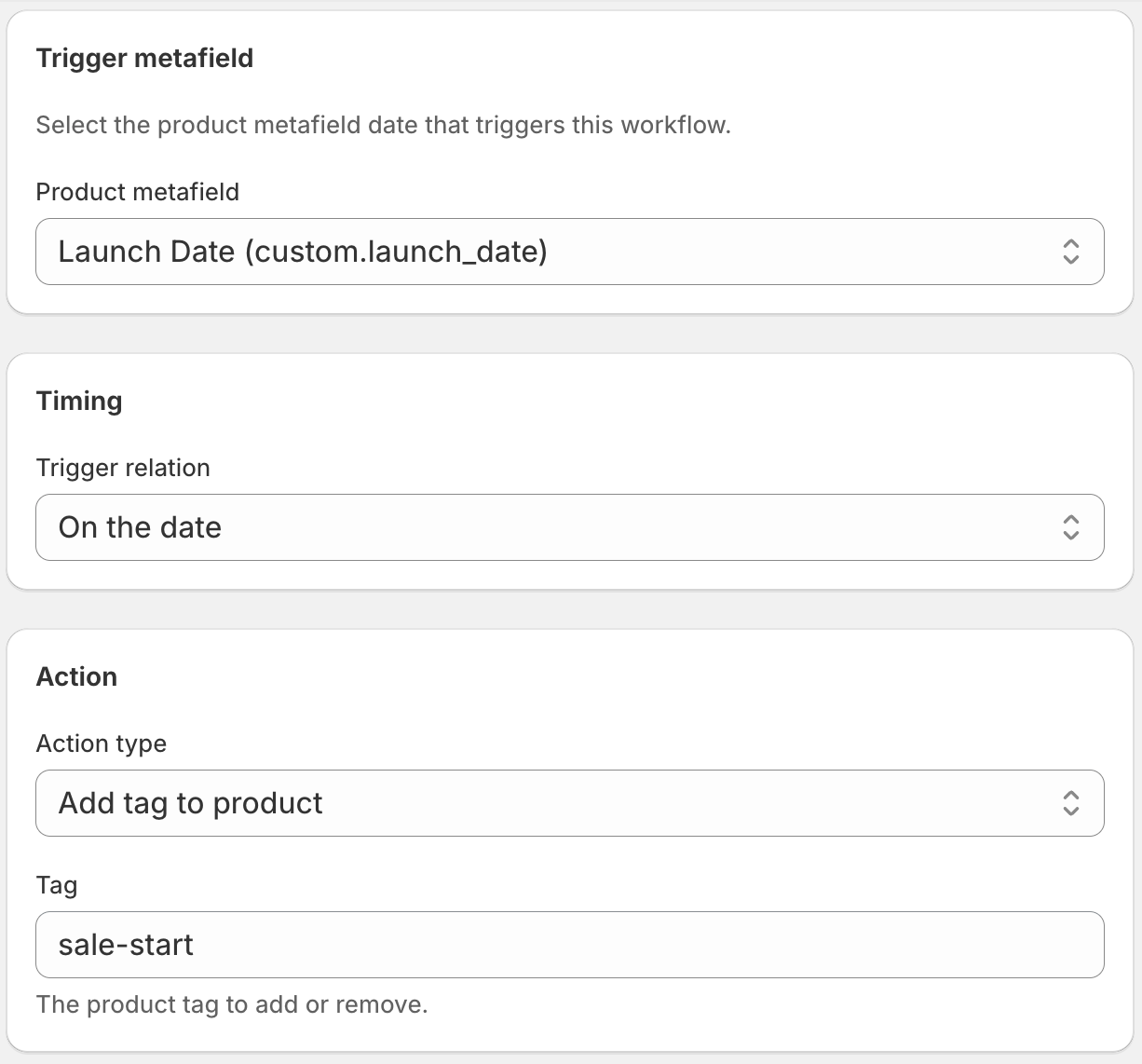
If you only want the first half of this, my walkthrough on how to auto-tag a new arrival on its Shopify launch date covers Workflow 1 on its own.
Workflow 2, remove the tag 30 days later:
Timing: 30 days after the date
Action: Remove tag → new-arrival
Once both workflows are live, you never touch the New Arrivals collection again. Products flow in on launch day and out 30 days later, all without any manual intervention. The removal half deserves its own attention, so I wrote a separate guide on how to remove the "new" tag in Shopify automatically if that's the piece you keep forgetting.
How long should a product stay in New Arrivals: 5, 30, or 60 days?
It's your choice, set by one number. 30 days is a sensible default, but match it to your release cadence. Say you sell socks and drop fresh designs constantly: you might want each new pair to appear in New Arrivals, then disappear after 5 days so the section always shows the very latest. A store with quarterly drops might stretch the window to 60.
Whatever window you pick (5, 30, or 60 days), you change just the offset on Workflow 2. Set it to 5 and products show products added in the last 5 days; set it to 60 and the collection holds two months of arrivals. "New" means whatever you want it to.
You might wonder why not just do this in Shopify Flow. Flow is excellent at order automation, it just struggles to compare a product date against today. I dug into exactly why in Shopify Flow date comparison not working, and it's the reason DateCue exists. For the wider picture of product-date automations, the DateCue guide walks through every action you can fire from a date.
💡 Works alongside product status: in this setup DateCue manages the tag, and it can also set product status as a separate action. If a product is still in draft on its launch date, it gets the tag but won't appear in any customer-facing collection until it's active. Combine this with a publish-on-launch-date workflow to handle both automatically.
Frequently asked questions
What if I have existing products that should be in New Arrivals?
Set their custom.launch_date metafield to a date in the past within your freshness window. For example, if your window is 30 days and a product launched 10 days ago, set the date to 10 days ago. DateCue will see the date has passed the "on the date" trigger and has not yet passed the "30 days after" trigger, so it'll add the tag on the next sync.
Can both workflows use the same metafield?
Yes. That's the design. One metafield, two workflows, different timing offsets. DateCue evaluates each workflow independently, so the add workflow fires on day 0 and the remove workflow fires on day 30 from the same date value.
What happens to products launched before I set up this system?
Products without the custom.launch_date metafield set are ignored by both workflows. They won't be touched. To bring existing products into the system, set the metafield on them retroactively.
Does this work with manual collections?
No. Manual collections don't respond to tag changes automatically. You need an automated (smart) collection with a tag rule for this to work hands-free. If you currently use a manual collection, you can convert it or create a new automated one alongside it.
Can I make products appear in New Arrivals then disappear after 5 days?
Yes. Set Workflow 2 (the remove-tag step) to 5 days after the launch date. The product gets the new-arrival tag on launch, shows in the collection, then drops out 5 days later. Use any window you like: 5, 30, or 60 days, all by changing that one offset.
Can I build a New Arrivals collection with metafields?
Yes, indirectly. Shopify smart collections filter on tags, not metafield dates, so DateCue reads each product's launch date metafield and adds or removes the new-arrival tag for you. The collection rule matches that tag, giving you a metafield-driven New Arrivals section that updates itself.
How much does DateCue cost?
DateCue is free forever for up to 100 product cues a month. Paid plans start at $9/month (Starter: 10,000 cues) and scale to $19/month (Scale: 100,000 cues, plus webhooks). All paid plans include a 14-day free trial.
Give your New Arrivals collection a brain.
Install free, prove out one workflow, then add the second on Starter.
Install free on ShopifyFree: 100 cues/month. Starter: 10,000 cues/month for $9/mo.