
End a Shopify Sale and Clean Up Tags Automatically

The sale is over, but the products are still tagged "on-sale." Customers see stale sale pricing. Your sale collection is full of things that aren't on sale. This is how you stop that from happening.
Why do products stay in the sale collection after a Shopify sale ends?
They stay because the on-sale tag is still on them. Your smart collection keeps everything that carries that tag, so until someone strips it by hand, last week's promo lingers. DateCue removes the tag automatically on the end date, and the collection clears itself.
If you haven't set up the sale start workflow yet, read Start a Shopify Sale Automatically With a Tag first. This guide covers the ending side of the same system.
Step 1: Create the sale end metafield
You need a date metafield that holds when each product's sale stops. In your Shopify admin go to Settings, then Custom data, then Products, and add the definition below. Set it on every product in the promotion: one shared date, or a different date per product if you stagger things.
- Namespace and key:
custom.sale_end - Type: Date and time or Date
Step 2: The DateCue workflow
One workflow does the work. Point DateCue at the custom.sale_end metafield, set the timing to "on the date," and choose the remove-tag action with the tag name "on-sale." When a product's end date arrives, DateCue strips that tag. Here's the exact config to copy.
Timing: On the date
Action: Remove tag → on-sale
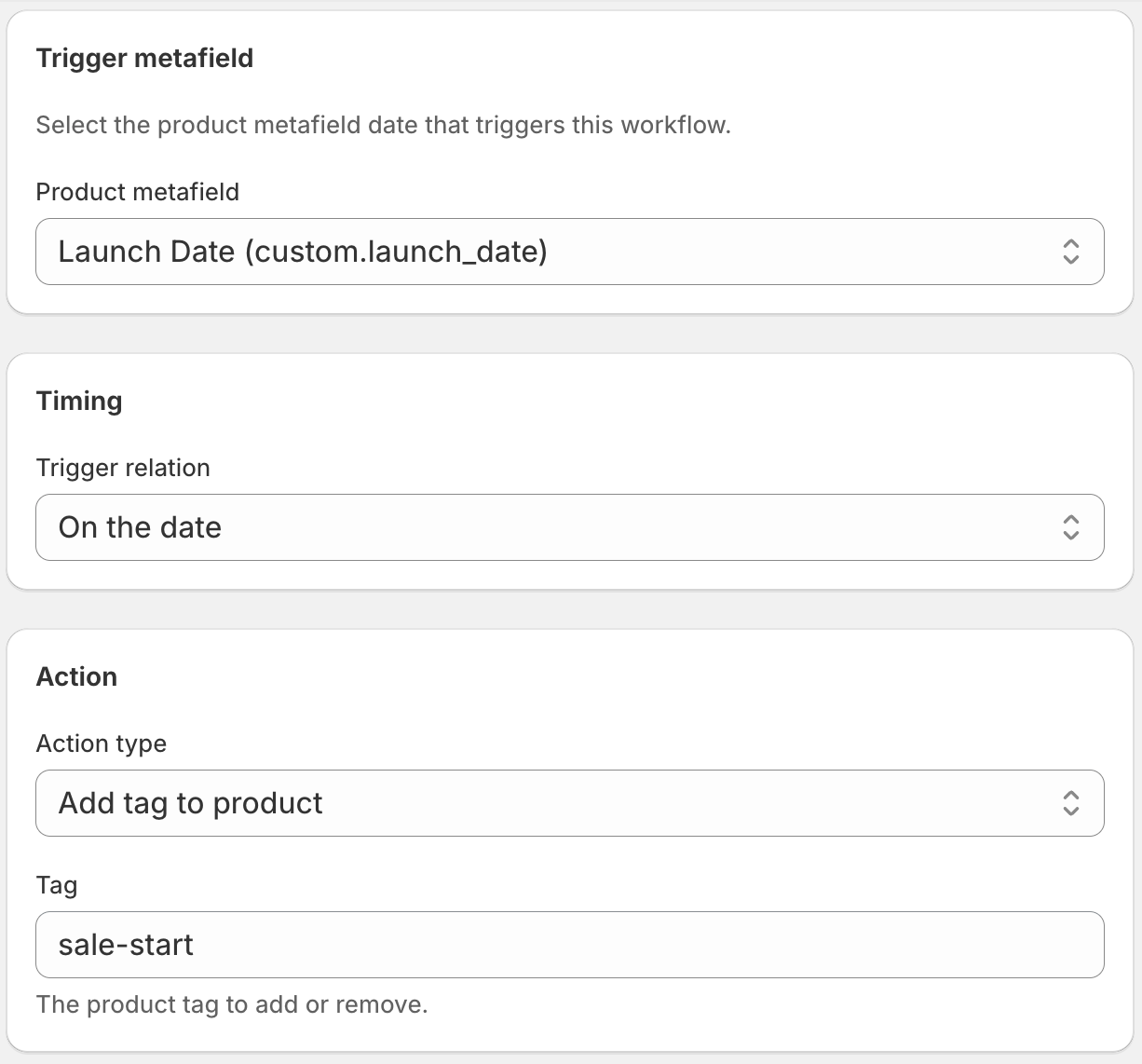
When the end date arrives, DateCue removes the "on-sale" tag from every product with that date. The smart collection drops them automatically. The sale is over, cleanly, on time, without you touching anything.
The complete sale system: two metafields, two workflows
Pair a start workflow with the end workflow and your whole promotion runs itself. One metafield holds the start date and adds the tag, the other holds the end date and removes it. Set both values before the sale begins, and you never have to be in Shopify when it opens or closes.
custom.sale_start→ Add tag "on-sale" on start datecustom.sale_end→ Remove tag "on-sale" on end date
Want the same idea for permanent markdowns instead of timed promos? See tag clearance products by date in Shopify, which uses one date metafield to flag stock for clearance.
Can you run a Shopify sale off one date metafield?
Yes, if your sale always runs the same length. Keep a single custom.sale_start metafield and let DateCue add the tag on that date, then remove it a fixed number of days later. No second metafield to maintain. Here's how the two workflows split the work off one date.
- Workflow 1: On the date → Add tag "on-sale"
- Workflow 2: 7 days after the date → Remove tag "on-sale"
This is simpler to manage if your sale length is consistent. If it varies per promotion, the two-metafield approach gives you more control.
💡 What about compare-at pricing? DateCue manages tags and product status, it doesn't change prices. Your compare-at price (the "was" price) needs to be set and cleared manually in Shopify, or through a Shopify Script or discount. DateCue's tag removal takes care of the collection and any theme sale badges driven by tags.
If you've tried to do this date logic in Shopify Flow and hit a wall, you're not alone. Flow is great at order automation, it just isn't built for comparing product dates. See why Shopify Flow date comparison doesn't work for the full story and the workaround.
Frequently asked questions
What if I want to end the sale early?
Change the custom.sale_end date on the relevant products to today's date (or a past date). DateCue will remove the tag on its next check. Alternatively, remove the metafield value entirely, and DateCue will stop watching those products: the tag stays until you remove it manually or set a new end date.
Can I extend the sale without changing every product?
Yes. Use Shopify's bulk editor to update custom.sale_end on all sale products at once. Filter by tag "on-sale" to find them, then bulk update the metafield to the new end date. DateCue will honour the new date.
Will this work if I use a different tag name?
Yes. Use whatever tag name your store or theme expects. Just make sure the tag name in the DateCue remove workflow matches the tag name in the add workflow exactly, and matches the rule in your smart collection.
How precise is the timing?
DateCue checks every minute. If your sale end metafield is a Date (not Date and time), the workflow fires within the first minute after midnight on the end date in your Shopify store's timezone.
How much does DateCue cost?
DateCue is free forever for up to 100 product cues a month. Paid plans start at $9/month (Starter: 10,000 cues) and scale to $19/month (Scale: 100,000 cues, plus webhooks). All paid plans include a 14-day free trial.
Run cleaner promotions.
Free for one workflow. Starter ($9/mo) covers start and end.
Install free on ShopifyFree: 100 cues/month. Starter: 10,000 cues/month for $9/mo.