
How to Automatically Remove the "New" Tag From Shopify Products

Go look at your New Arrivals collection right now. How many of those products actually launched in the last 30 days? If the answer is "not many," here's how to remove the new tag from Shopify products automatically, so products drop out of New Arrivals on their own instead of the label lingering for a year. Whether you want to auto-remove the newarrival tag 30 days after a product is published, or untag after 24 hours, the setup is the same.
Why does the "new" tag go stale?
The "new" tag goes stale because nobody owns removing it. A product launches, gets a "new-arrival" product tag, and shows up in New Arrivals. Months pass. Removing tags never lands on anyone's to-do list, so a returning customer scrolls through "New Arrivals" and sees products they bought last year.
It's a small trust erosion. Not catastrophic. But it signals a store that isn't quite on top of things, and shoppers notice.
The reason this is so fiddly to fix in Shopify Flow is timing. To remove a tag a set period after a product is published, you'd need a delay feature in Flow, and that doesn't exist yet. People end up reaching for Flow's "Run Code" block to compute the date themselves, and even that has known bugs handling Date values. So the "untag X days later" job that sounds trivial turns into a workaround that breaks.
The fix is simple: a second workflow that removes the tag automatically after 30 days (or whatever window suits your cadence). Combined with the workflow that adds the tag on launch, you get a New Arrivals section that manages itself completely.
The workflow
To remove the new tag automatically, you point one DateCue workflow at your launch-date metafield, set the timing to 30 days after that date, and choose the "remove tag" action for "new-arrival". That's the whole setup. DateCue strips the tag when the window passes, and the product drops out of your New Arrivals collection.
Timing: After the date (30 days)
Action: Remove tag → new-arrival
Filter: none
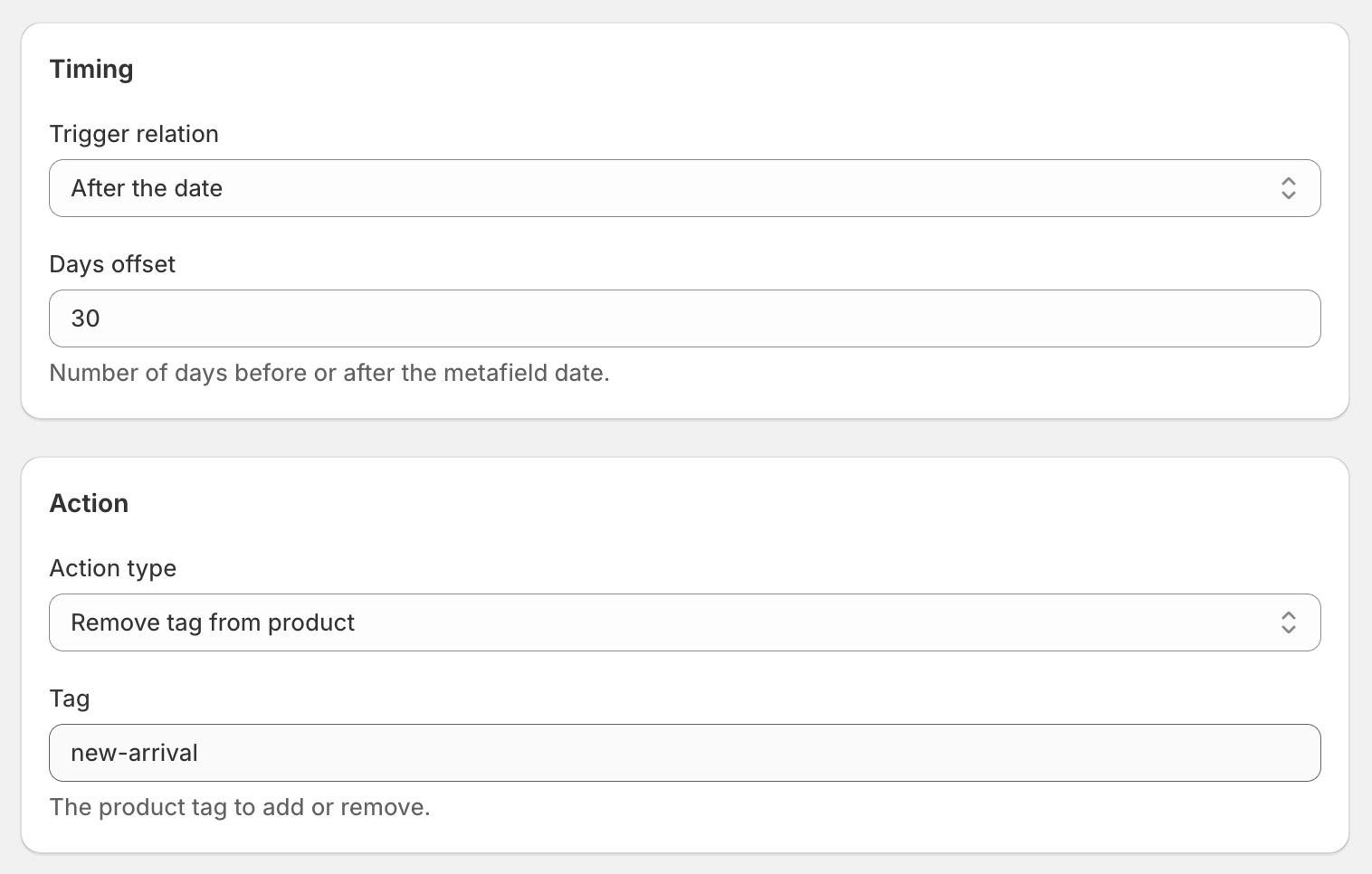
It runs off the same custom.launch_date metafield as the add-tag workflow, just with different timing. DateCue counts 30 days from the launch date and fires the remove action. The product leaves your New Arrivals smart collection automatically.
How long should the "new" tag last?
For most stores, 30 days is the sweet spot: long enough to get value from the "new" label, short enough that it stays honest. Match it to how often you launch. A store dropping products weekly might want 14 days, while one that launches a few times a year can stretch to 60 or 90.
Change the "30 days" offset in the workflow to whatever feels right. DateCue lets you set any number of days. If you also schedule launches with Shopify's future publishing tool, line the launch date up with the metafield so both the add and remove steps fire on time. New to dates and metafields? Start with the DateCue product date guide.
What about products that already have the tag?
The remove workflow only fires for products that have the custom.launch_date metafield set. So products tagged "new-arrival" before you set this up, with no launch date stored, won't be touched. To bring them in, either remove their tags by hand once or backfill the metafield with each product's real launch date.
💡 See the complete system: The full two-workflow setup (add on launch, remove after 30 days) is covered in one place: keep your Shopify New Arrivals collection always fresh. If you've tried wiring this up in Flow and the dates won't compare, that's covered in the Shopify Flow date comparison guide.
Frequently asked questions
What happens to products that already have the tag from before I set this up?
This workflow only fires for products that have the custom.launch_date metafield set. Products with the tag but no metafield won't be affected. You can either clean those up manually or backfill the metafield with historical launch dates if you want the workflow to cover them too.
Can I change the 30-day window to something else?
Yes. Set whatever offset works for your store's release cadence. 14, 30, 60, 90 days. It's up to you. You can also have two workflows on the same metafield if you want a shorter "new" window for some product types and longer for others (using tag filters to distinguish them).
Do I need both the add and remove workflows for this to work?
Technically no, you could just set up the remove workflow and manually add the "new-arrival" tag when products launch. But using both gives you a fully automated system that doesn't require any manual tagging at all. That's the point.
What if a product has the tag for a different reason?
DateCue will still remove the tag when the 30-day window passes. If you have products where "new-arrival" is meant to be permanent, use the Exclude tags filter in the workflow, for example exclude products tagged "permanent-new" to protect them from the remove action.
Can I untag a product 24 hours after launch instead of 30 days?
Yes. The offset is just a number of days, so 1 day works the same as 30. Set the timing to After the date with your chosen offset, and DateCue removes the newarrival tag then, so products drop out of New Arrivals automatically on the window you pick: 24 hours, a week, or a month.
Why can't Shopify Flow just remove the tag after a set time?
Flow has no delay feature, so there's no native way to act a fixed period after a product is published. People fall back on Flow's "Run Code" block to work out the date, but that has known bugs with Date values. DateCue handles the timing directly off the metafield, so the untag fires reliably.
How much does DateCue cost?
DateCue is free forever for up to 100 product cues a month. Paid plans start at $9/month (Starter: 10,000 cues) and scale to $19/month (Scale: 100,000 cues, plus webhooks). All paid plans include a 14-day free trial.
Give "new" a real expiry date.
Free for the remove workflow on its own. Add the launch-day tagger and you're on Starter.
Install free on ShopifyFree: 100 cues/month. Starter: 10,000 cues/month for $9/mo.