
Auto-Tag Shopify Products as New Arrivals When They Launch

Here's a trick that makes your New Arrivals collection self-managing: use DateCue to add a newarrival tag when a product launches, and Shopify's smart collection machinery does the rest. No Flow, no manual updates, no forgetting. If you've been hunting for a way to auto-tag products added that day, or to tag products published in the last 30 days so they get a "new" badge, this is it.
How do Shopify smart collections and tags work together?
Shopify automated (smart) collections are driven by rules, and tag matching is one of the most useful. You build a collection that includes any product tagged "new-arrival." The moment a product gets that tag, it appears. The moment the tag is removed, it drops out.
DateCue is the piece that adds (and removes) the tag based on your launch date metafield. You set the date, DateCue fires the tag, the collection updates. The whole system is automatic once it's configured, and you don't need to wire up a Shopify Flow trigger to do it. This is the gap a lot of merchants run into: there's no direct trigger for "product tag added", and no native "product published" tag automation either, so the obvious approaches dead-end. If you've fought with Flow date logic before, the Flow date comparison troubleshooting guide explains why product dates trip it up.
One honest detail before you set this up. Most people picture tagging driven off the Shopify published date, so a product added today automatically gets the new badge. DateCue doesn't read published_at on its own. It acts on a date metafield. The practical setup is to set a launch_date metafield when you create the product, or copy the publish date into that metafield. It's one extra field at creation time, and from there the tagging runs itself.
Step 1: Create the Shopify smart collection
In Shopify admin, go to Products → Collections → Create collection. Set it to Automated and add a rule: Product tag → is equal to → new-arrival. Save it. That's your New Arrivals collection. It stays empty until products start getting the tag.
Step 2: Set up the launch date metafield
DateCue reads the launch date from a product metafield, so you need one defined. If you don't have a launch date metafield yet, create it at Settings → Custom data → Products. Give it a clear namespace and key, pick a date type, then set the value on each product:
- Namespace and key:
custom.launch_date - Type: Date or Date and time
Set this metafield on each product with its launch date.
Step 3: Build the DateCue workflow that adds the tag
One workflow does the work. Point DateCue at your custom.launch_date metafield, set the timing to fire on the date, and choose the "add tag" action with the value new-arrival. Leave the filter empty so it covers every product with a launch date. That's the whole config:
Timing: On the date
Action: Add tag → new-arrival
Filter: none
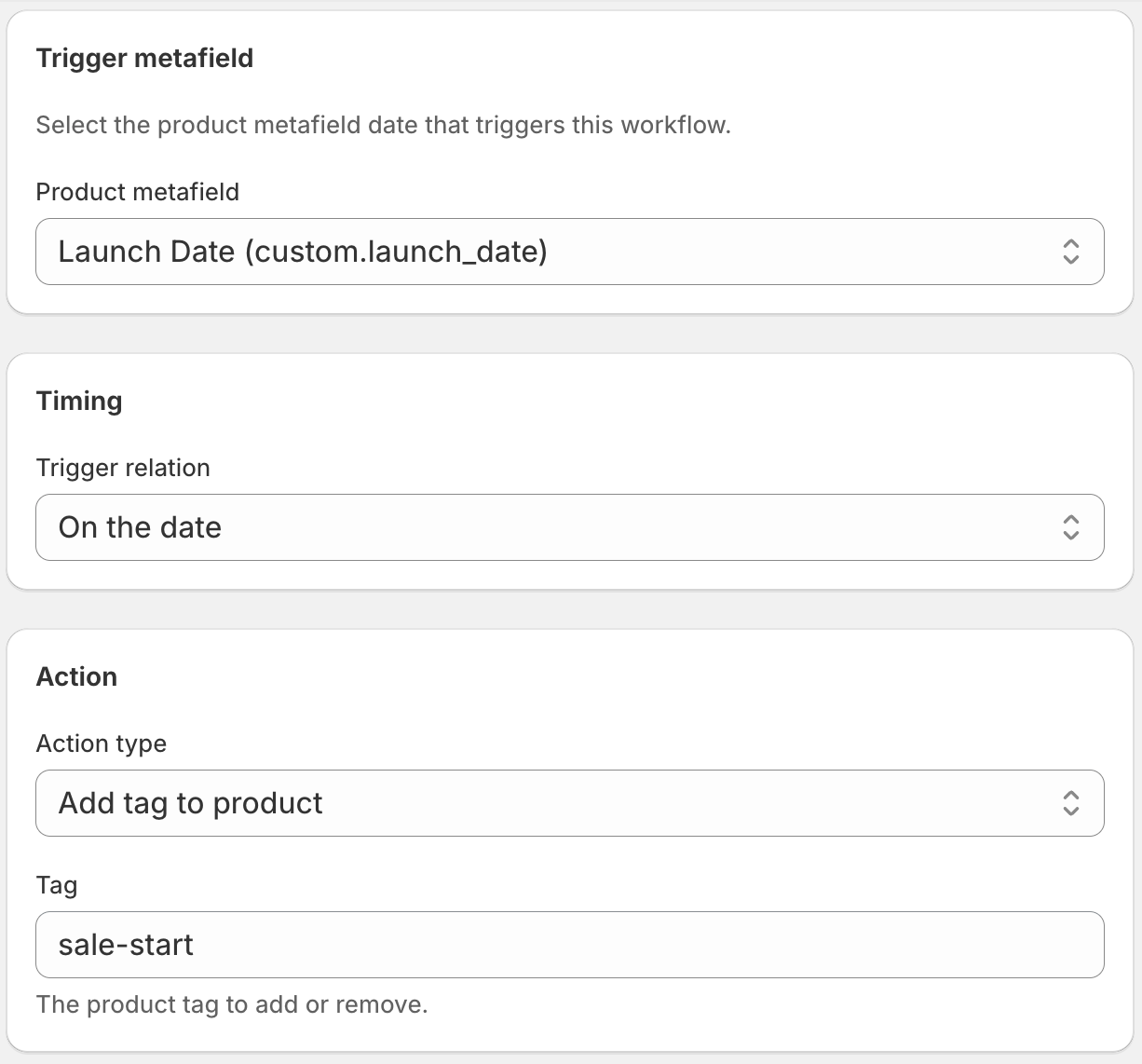
From this point on, whenever a product's launch date arrives, DateCue adds the "new-arrival" tag, and Shopify adds the product to your New Arrivals collection automatically. If you're new to date-based actions, the DateCue product guide walks through how a metafield date becomes an automatic action.
Why adding the tag is only half the system
Adding the tag is the easy part. The real problem most stores hit is that products stay tagged "new-arrival" indefinitely. The collection fills up with items that launched months or years ago, the word "new" loses all meaning, and shoppers stop trusting the section. You need the tag to come off too.
To complete the system, set up a second workflow that removes the "new-arrival" tag 30 days after launch. Together, the two workflows create a New Arrivals section that's always accurate without anyone managing it.
There's a full walkthrough of the two-workflow system in the guide: keep your Shopify New Arrivals collection always fresh.
💡 Tag name flexibility: You're not locked into "new-arrival." Use whatever tag your theme or collection rules already expect. If your theme shows a "New" badge on products with the tag "new", use that tag name in the workflow instead.
Frequently asked questions
How do Shopify smart collections use tags?
Smart (automated) collections in Shopify update in real time based on rules you set. A tag rule means: any product with this tag is in this collection, automatically. When DateCue adds a tag to a product, the collection picks it up within a few minutes.
Can I use a different tag name?
Yes. Use whatever tag your store needs. Just make sure the tag name in the DateCue workflow matches the tag name in your smart collection rule exactly (case-sensitive).
What if my products don't have a launch_date metafield yet?
Start by adding the metafield definition at Settings → Custom data → Products. Then set the date on each product you want to track. DateCue will pick them up on the next sync. Products without the metafield set are ignored by this workflow entirely.
Does this work for products I import via CSV?
Yes. As long as the CSV import populates the custom.launch_date metafield, DateCue will find it. Shopify's CSV import supports metafield columns. Check Shopify's metafields documentation for the correct column format for metafield imports.
Can I tag products published in the last 30 days automatically?
Almost. DateCue tags off a date metafield, not the Shopify published date directly. Set a launch_date metafield to the publish date when you create the product, and DateCue adds the newarrival tag on that date. To drop products out after 30 days, pair it with a second workflow that removes the tag.
Is there a Shopify trigger for "product tag added"?
No, Shopify Flow has no direct "product tag added" trigger and no native "product published" tag automation, which is why people get stuck. DateCue sidesteps both: it watches a launch date metafield and adds the tag on that date, so your smart collection and new badge stay in sync without a trigger.
How much does DateCue cost?
DateCue is free forever for up to 100 product cues a month. Paid plans start at $9/month (Starter: 10,000 cues) and scale to $19/month (Scale: 100,000 cues, plus webhooks). All paid plans include a 14-day free trial.
One workflow is free. Use it for this.
Install DateCue and set up your New Arrivals tagger in five minutes.
Install free on ShopifyFree forever: 100 cues/month. No card required.