
Shopify Compliance Product Expiry Automation for Food, Pharma & Regulated Stores

Selling food, supplements, pharmaceuticals or cosmetics on Shopify means living with a date you can't afford to miss. A single expired listing that gets shipped is an unhappy customer in the best case and a regulator's letter in the worst. Shopify compliance product expiry automation fixes the storefront side of that problem: this guide walks through a complete workflow that removes expired stock on time, alerts your team in advance, and produces a usable audit trail. Set it up once and it runs itself.
What rules govern selling expired products online?
The specifics vary by jurisdiction and category, but the principle holds across most developed markets: a retailer that knowingly or negligently sells past the safety date of a regulated product is exposed to penalty, recall, and civil liability. Below is a short, non-exhaustive sample of the frameworks your store may sit under.
- United States (food and supplements): the FDA's Food Safety Modernization Act and 21 CFR govern food and dietary supplement safety. Retailers are expected to maintain stock control that prevents the sale of expired product.
- European Union (food): Regulation (EU) 1169/2011 governs food information and date marking. Member-state enforcement bodies treat the sale of food past its use-by date as an offence.
- United Kingdom: the Food Safety Act 1990 and the General Product Safety Regulations 2024 (GPSR) extend retailer duties for any unsafe product placed on the market.
- Cosmetics: the EU Cosmetics Regulation (1223/2009) and the FDA's Federal Food, Drug, and Cosmetic Act require that cosmetic products remain safe and labelled for their period of use.
- Pharma and OTC: almost universally regulated. Selling expired pharmaceutical product is treated as a serious offence in essentially every market.
None of those frameworks care whether the expiry was deliberate or accidental. They care whether you had a system in place that should have prevented it. An automated, dated, logged system is exactly the kind of control that satisfies "reasonable diligence" tests.
This article is not legal advice. The regulatory burden on your store depends on your jurisdiction, categories and corporate structure. Consult a compliance specialist for your specific situation.
Why does manual expiry management keep failing?
Manual expiry management fails because it depends on a person remembering. The honest version of how most stores handle it is a spreadsheet, a calendar reminder, and the assumption that someone will look at it. People take holidays, change jobs, and miss rows. The failure modes are predictable, and every one of them ends with an expired listing still live and purchasable.
- Staff turnover, and the spreadsheet stops being updated.
- A new batch arrives with a different expiry, and only some products get their date updated.
- A holiday weekend lines up with three batch expiries.
- A product moves between locations and the central record drifts from reality.
The only reliable system is one that can't forget. A workflow tied to a structured date on the product record, evaluated automatically every minute, removes the human-memory layer entirely. Shopify's own future publishing can schedule a product to go live on a date, but it can't watch an expiry metafield and take it down, which is the case that matters here. (If you've tried to do this with Shopify Flow date comparison, you'll know it doesn't reliably fire on product dates either.)
How does the DateCue compliance system work?
The whole system runs off a single product metafield, custom.expiry_date. Four single-action workflows handle the four phases of the lifecycle: advance warning, last-chance flag, removal, and audit log. Each workflow does one job, which keeps the logic auditable and the failure modes obvious when something needs checking.
Step 1: Set up the expiry date metafield
A metafield is a structured field you add to the product record, and it gives DateCue a clean date to act on. In Shopify admin go to Settings, Custom data, Products and add a metafield definition. Set it up once and reuse it across every regulated product you sell:
- Name: Expiry Date (or Use By, Best Before)
- Namespace and key:
custom.expiry_date - Type: Date
Populate the metafield on every regulated product. When a new batch arrives with a different expiry, update the metafield to the new batch's date. DateCue always acts on the current value.
Step 2: Create a "Last Chance" smart collection
This step is optional but recommended. A Shopify automated collection driven by the expiring-soon tag gives customers a final-chance window and lets you discount stock you'd otherwise lose to removal. In Shopify admin go to Products, Collections, Create collection, set it to Automated, then add the rule Product tag is equal to expiring-soon.
Step 3: The four workflows
Each of the four workflows is a single-action rule on the same custom.expiry_date metafield, so they all read the one date you maintain. Build them in DateCue in the order below: the 30-day alert first, then the 7-day tag, the on-date archive, and finally the audit log email.
Workflow 1, 30-day advance alert (team review):
Timing: 30 days before the date
Action: Send staff email → compliance@yourstore.com
Filter: Status = Active
Your compliance officer or buyer gets one email per affected product, with the product name, the expiry date, and an admin link. Thirty days is the standard procurement window; adjust upward for slow-moving categories. If you want escalating product expiration alerts, run extra copies of this workflow at tighter offsets, a 10-day, 5-day and 2-day warning sequence is common in regulated categories. There's a fuller walkthrough of this alert in emailing your team before a product expires.
One thing to be clear about, since it matters for compliance planning: these emails go to your team, not your customers. DateCue sends staff and team notifications only. It can't email the shopper. So the alerts here are for your compliance officer, buyer, or warehouse, the people who act on lead time inside the business. Anything customer-facing would need a separate email platform.
Workflow 2, 7-day last-chance tag (customer-facing):
Timing: 7 days before the date
Action: Add tag → expiring-soon
Filter: Status = Active
The product tag pushes the product into your Last Chance collection automatically. Pair this with a markdown rule or a discount code if you want to encourage sell-through. For the standalone version of this rule, see adding an expires-soon tag before expiry.
Workflow 3, on expiry day (automated removal):
Timing: On the date
Action: Set status → Archived
Filter: Status = Active
Setting the product status to Archived removes the product from the storefront and from all sales channels, but preserves historical order data for reporting and refunds. For regulated categories archive is usually preferable to draft because it produces a cleaner audit boundary. The same mechanism powers our guide to auto-hiding Shopify products on their expiry date.
Workflow 4, audit log email (timestamped record):
Timing: On the date
Action: Send staff email → compliance@yourstore.com
Filter: Status = Active
This email lands the same day as the archive action and serves as the contemporaneous record that the product was removed on its expiry date. The email subject and body include the product, the date, and the action timestamp. That's exactly the kind of evidence a regulator wants to see in a "show me your controls" conversation.
How do you build a usable audit trail?
The audit log email from Workflow 4 is the foundation, but a defensible audit trail usually wants two layers: per-event evidence and a per-period summary. The first proves each individual removal happened on time, and the second lets you show a regulator the whole picture for a month or quarter at a glance.
- Per-event evidence: the email itself, retained in a dedicated mailbox or compliance folder. Each email is a timestamped, per-product record of removal.
- Per-period summary: a monthly or quarterly extract that lists every archived-due-to-expiry product in the period. The cleanest way to produce this is to filter your Shopify admin product list by status Archived and updated-in-period, or pipe the records into an ERP. On the Scale plan, DateCue can fire a webhook on the expiry-day action so the removal is logged straight into your own system.
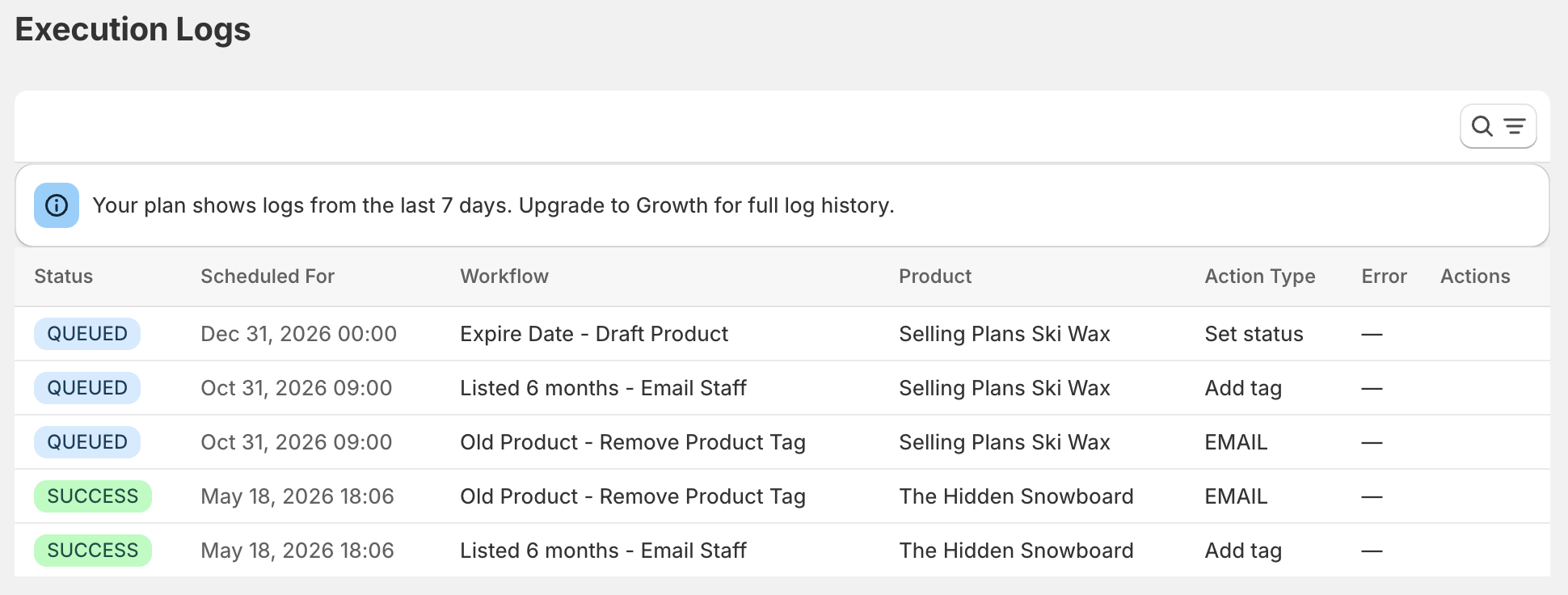
DateCue's own execution log retains every fired action with timestamps for the retention period of your plan (7 days on Free and Starter, full retention on Scale). For longer retention than your plan provides, the email evidence stream is the more durable record.
How do you handle batch-dependent expiry dates?
The hardest real-world case is a product with several batches in stock at once, each with a different expiry. Shopify's product model doesn't natively track batch-level data, so you pick one of three approaches: treat the product as its current front-of-shelf batch, split batches into variants, or push batch tracking to a dedicated inventory system.
- Treat product = current batch: update
custom.expiry_datewhen a new batch becomes the front-of-shelf. Simple, suits FIFO stock control. - Use variants for batches: each variant has its own expiry metafield. Higher overhead but exact.
- Use a third-party inventory system: for serious batch tracking, an ERP or warehouse management system is the right tool. DateCue handles the Shopify-side display logic; the ERP handles physical inventory.
Most small and mid-sized regulated stores use the first approach. The second is worth the overhead for high-value or high-risk SKUs like pharmaceuticals.
What DateCue is, and is not, responsible for
DateCue automates the Shopify storefront side of expiry: when a date passes, the product disappears from your store. That's a meaningful piece of the compliance system, but it isn't the whole system. Physical inventory, fulfilment controls, and supplier or label documentation all sit outside DateCue and stay your responsibility, as set out below.
- Physical inventory: expired stock in your warehouse still needs to be pulled and disposed of. DateCue does not see your warehouse.
- Fulfilment controls: if your warehouse can pick an expired item against an existing order placed before expiry, that's a fulfilment-process problem.
- Supplier and label documentation: certificates of analysis, batch records and labelling compliance are upstream of the storefront.
Think of DateCue as one control in a layered system, with explicit responsibility for one thing: the storefront state of a product on and after its expiry date.
⚠️ Disclaimer: DateCue automates Shopify product visibility based on dates you provide. It does not guarantee compliance with any specific regulation in your jurisdiction. For businesses with strict regulatory obligations, consult a compliance specialist to ensure your end-to-end process meets the applicable standards.
Frequently asked questions
What product categories does this apply to?
Any product with a regulated sell-by or use-by date. Common categories: packaged food and beverages, dietary supplements and vitamins, over-the-counter medications, cosmetics and skincare with preservative-dependent shelf life, infant formula, agricultural products, and medical devices with sterility expiry dates.
Does DateCue make my store compliant with food safety law?
DateCue automates the Shopify-side removal of expired products. Compliance is a broader system that includes physical inventory, warehouse procedures, supplier documentation and labelling. DateCue removes one of the most common failure modes (a live, purchasable storefront listing for expired stock) but does not on its own constitute compliance with a specific regulation.
How do I handle batch-dependent expiry dates?
Update the custom.expiry_date metafield when a new batch with a later expiry date is received. DateCue recalculates all future workflow triggers from the updated value. For products where multiple batches are sold simultaneously with different expiry dates, list them as separate products or variants with their own expiry metafields.
Can I keep selling past the printed expiry date but before my internal sell-by date?
The custom.expiry_date metafield should reflect your business's sell-by decision, which can be more conservative than the manufacturer's printed expiry. DateCue acts on whatever date you put in the metafield. Many regulated sellers set the metafield 30 to 60 days before the printed date to leave a safety buffer.
Will the expired product still appear in my reports?
Yes. Archiving a product in Shopify removes it from the storefront and active product list but preserves all historical order data. Reports, refunds, and customer order history remain intact. Archived products can be unarchived at any time.
Can I get a daily digest of upcoming expiries instead of per-product alerts?
DateCue sends alerts per product. A daily digest view is on the roadmap. In the meantime, the per-product emails can be filtered to a dedicated inbox or piped into a tool that aggregates them into a daily summary.
Can I set 10-day, 5-day and 2-day expiration warnings?
Yes. Run one alert workflow per offset on the same expiry metafield: 10 days before, 5 days, then 2 days. Each fires its own staff email, so the warnings escalate as the date nears. Use whatever offsets suit your category; 30/14/7 and 10/5/2 are both common in regulated stores.
Do the expiry alerts go to my customers or only my team?
Only your team. DateCue sends staff and team emails, never customer emails. The product expiration alerts reach your compliance officer, buyer, or warehouse so they can act on lead time. Any customer-facing message would need a separate marketing email platform.
How much does DateCue cost?
DateCue is free forever for up to 100 product cues a month. Paid plans start at $9/month (Starter: 10,000 cues) and scale to $19/month (Scale: 100,000 cues, plus webhooks). All paid plans include a 14-day free trial.

Matt Burrell
Founder of Ripen Studio. Compliance was the use case that made me certain DateCue had to exist, because too many regulated merchants were carrying this risk on a spreadsheet. More about Matt.
Take expiry off your team's plate.
Try DateCue free, then upgrade to Scale when you're ready to run the full four-workflow compliance system.
Install free on ShopifyFree plan: 100 cues/month. Scale: $19/mo, 100,000 cues/month, full execution logs.