
Send a Slack Alert When a Shopify Product Launches or Expires

The drop goes live at 10 am. By 10:04, someone in Slack asks if it went up. Someone else @-mentions the ops lead to double-check. A third person opens the admin to look. If you run product drops with a team, this scene is familiar: the automation handled the storefront, but the humans still had to catch up manually, in a channel that had no idea the date had just passed. A shopify product expiry slack notification, or any product-date Slack alert, doesn't exist natively. Shopify doesn't send one. Neither do most expiry apps. This guide shows how to route a product launch or expiry date straight into a Slack channel, so your team sees it the moment the date arrives.
The alert Shopify never sends
Shopify's Slack integration handles orders. A paid order fires a message. What it can't do is notify Slack when a product's expiry date passes, because Shopify has no concept of a date-triggered event for products. A metafield date you saved months ago doesn't "change" when the calendar catches up. It was always the 21st of June. June 21st just arrives, and Shopify notices nothing.
Most dedicated expiry apps reach for email when they need to alert someone: send a team notification 7 days before expiry, that's the common pattern. Email is good when you want a paper trail or need to reach someone outside your Slack workspace. But for teams who live in channels, email means lag: read it this morning, act this afternoon, find out at lunch the product was still live all day. For time-sensitive events, the alert needs to land where your team actually spends their time.
Shopify Flow does have a "Send Slack message" action, but that only helps if Flow can trigger the workflow in the first place. And Flow can't trigger from a product date metafield. That's a platform constraint, not a configuration problem, and it's covered in detail in the Flow date comparison guide. The short version: Flow is event-driven, and a date quietly arriving on a product isn't an event Flow detects.
How Slack incoming webhooks work
Slack's incoming webhooks are a free native feature. You create a channel-specific URL, and any POST request containing a text field appears as a Slack message. Setup takes five minutes, requires no app development experience, and there's no ongoing cost. The practical detail: Slack only processes the text field, so whatever you POST needs to include it, formatted for human reading.
That's the one thing to know before you wire DateCue to Slack. DateCue's webhook payload is a small JSON object describing the product and the date that triggered it. It doesn't have a text field, because DateCue is sending a structured event, not a pre-formatted message. So you need one step between DateCue and Slack to reshape the payload into something Slack will display. Zapier or Make handle that step in about two minutes.
How DateCue connects a product date to Slack
DateCue watches your product metafields and fires an HTTP POST to any URL you choose the moment a date condition is met. Route that POST through Zapier or Make, format the product details into a readable message, and forward it to your Slack channel URL. DateCue handles the trigger, Zapier or Make handles the formatting, and Slack shows the result in your chosen channel.
The payload DateCue sends contains six fields:
{
  "shopifyProductId": "gid://shopify/Product/7821934592010",
  "productTitle": "Cold Brew Concentrate 500ml",
  "productHandle": "cold-brew-concentrate-500ml",
  "metafieldValue": "2026-06-21",
  "executionId": "clx7y2a9b0001",
  "actionType": "WEBHOOK"
}
In Zapier or Make, those fields become variables you drop into a message template. "Cold Brew Concentrate 500ml has hit its expiry date (2026-06-21). Pull it from active now." That message, delivered to the right channel the moment the date passes, is the whole thing. The rest is just the plumbing that gets it there.
Setting it up with Zapier
Create a Zapier "Catch Hook" trigger to get a webhook URL, then add a Slack "Send Channel Message" action and format the message using the product fields DateCue sends. In DateCue, create a workflow with the Fire Webhook action pointed at that Zapier URL. The whole setup takes about five minutes and uses Zapier's free tier if you're not already a paid user.
Here's the full sequence:
Step 1: Create the Zapier trigger. In Zapier, create a new Zap. Choose "Webhooks by Zapier" as the trigger app and "Catch Hook" as the event. Zapier gives you a unique URL. Copy it and keep the Zap open in a browser tab.
Step 2: Add the Slack action. Add a second step: Slack, "Send Channel Message." Pick the channel where you want the alert (#ops, #drops, #merchandising, whatever makes sense for this product event). In the message body, use Zapier's field picker to insert productTitle and metafieldValue from the webhook payload. A simple format like "Product [productTitle] has reached its date ([metafieldValue]). Check the admin." is enough to be useful.
Step 3: Create the DateCue workflow. In DateCue, create a new workflow. Set the metafield to whichever date you want to monitor. Set the timing (on the date, or X days before or after). Set the action to "Fire webhook" and paste the Zapier URL from step 1.
Timing: On the date
Action: Fire webhook → https://hooks.zapier.com/hooks/catch/…
Filter: Status = Active
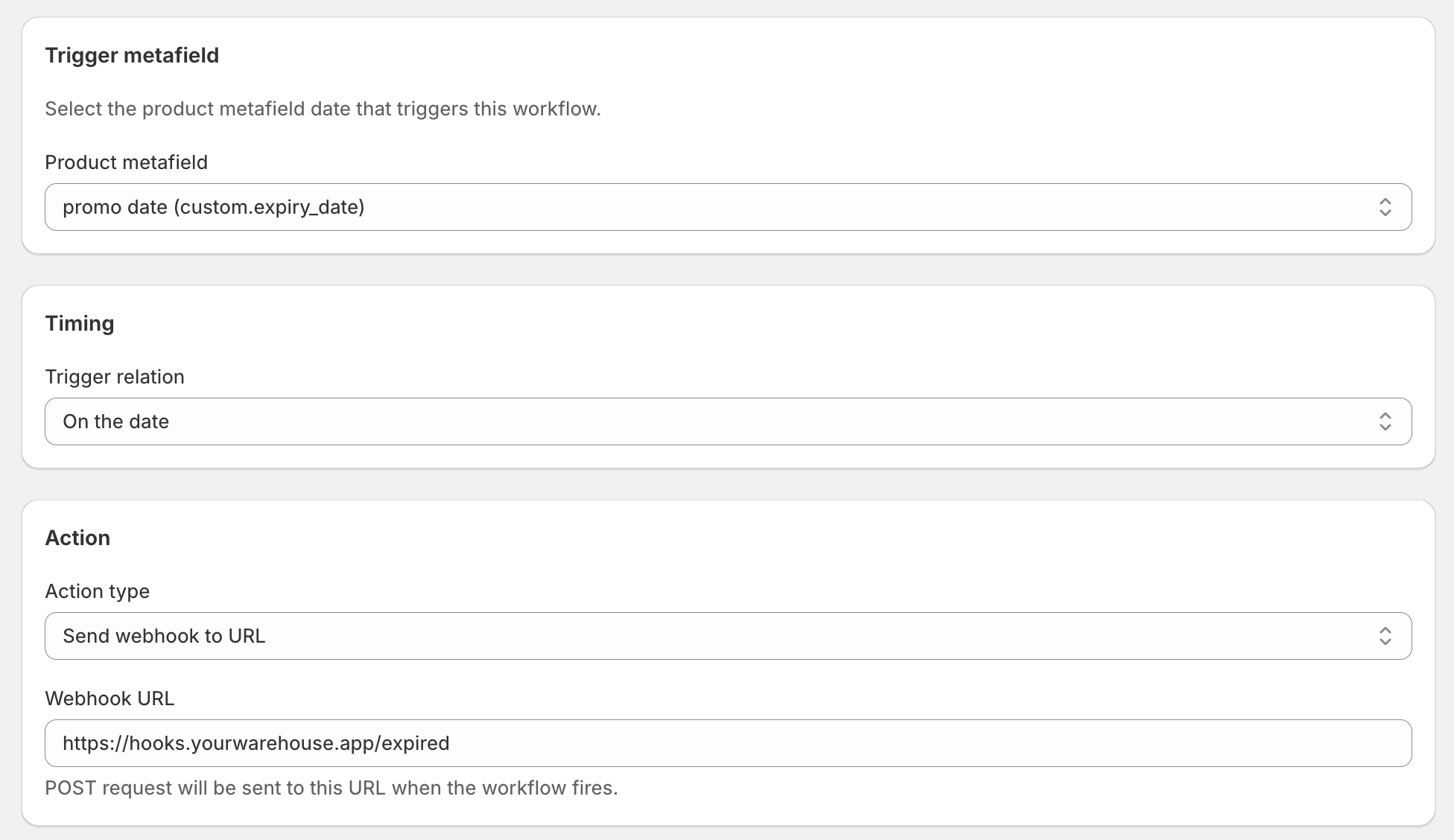
Publish the Zap, save the DateCue workflow, and the setup is live. The next time any tracked product's expiry date arrives, the chain fires: DateCue posts to Zapier, Zapier formats the message, Slack shows it in the right channel.
💡 Prefer Make or n8n? Both work the same way. In Make, use a "Webhooks" module as the trigger and a Slack "Create a message" module as the action. In n8n, a Webhook node followed by a Slack node. Pick whichever platform your team already uses.
Using the same setup for product launches
Swap the expiry_date metafield for launch_date and point the webhook at a #drops or #new-arrivals channel. The workflow is identical. DateCue pings Slack the moment the launch date arrives, confirming the automation ran and giving the team a heads-up in real time.
You can also set the timing before the date. A workflow that fires 60 minutes before launch gives your team a final check: confirm the product page is ready, make sure the images loaded, verify the collection is live. Then a second workflow fires on the launch date itself to confirm it happened. Stack both on the same launch_date metafield in DateCue, each with its own timing and its own Slack message. They run independently, share the same trigger date, and together give you a pre-launch brief and a go-live confirmation, automatically.
Slack or email: when to reach for which
Use email for recipients outside your Slack workspace, formal records, or cases where you need a paper trail. Use Slack for time-sensitive alerts your team needs to react to immediately, inline with the conversation where they'll act on it. DateCue has a built-in email action that covers the first group on every plan, including the free one.
The two aren't competing. For a perishables expiry, you might want both: an email to the buyer for the purchase record, and a Slack ping to the ops channel so someone pulls the batch from the pick list that same day. Stack two workflows on the same expiry_date metafield, one email action and one webhook, and both fire on the date. The email documents it; the Slack message creates the response. For the email side of this pattern, sending a pre-launch alert 7 days before a product goes live shows how the email action works in practice.
A note on the plan
Being straight about it: the webhook action is part of the Scale plan at $19 a month. DateCue's other actions, changing product status, adding a tag, removing a tag, and the built-in email alert, are available on every plan. If all you need is a team notification by email, you can do that from the free plan without touching a webhook.
Every paid plan includes a 14-day free trial. Build the whole Slack setup, fire a real webhook at a real Zapier URL, watch the message land in your channel, and decide it's worth it before any money changes hands. For the full technical detail on the webhook action itself, including the HMAC signature for verifying that requests are genuine, the DateCue webhook guide covers all of it.
Frequently asked questions
Can DateCue post directly to Slack without a middleware tool?
Not without a formatting step. DateCue sends a JSON payload with fields like shopifyProductId and productTitle, but Slack's incoming webhooks need a text field to display a message. Route the webhook through Zapier or Make first to shape the payload into a readable Slack message. The extra step takes five minutes and keeps the message clean.
Does this work with Slack's built-in incoming webhooks?
Yes, once you add a formatting step. Create a Slack app with incoming webhooks enabled, get the channel URL, then use Zapier or Make to catch the DateCue webhook and forward a formatted message to that URL. If you use Zapier's native Slack integration, you don't need to create a Slack app separately. Zapier handles the authentication for you.
Can I include the product name and date in the Slack message?
Yes. DateCue's webhook payload includes the product title, product handle, Shopify product ID, and the date metafield value that fired the workflow. In Zapier or Make, you pull those fields into the message template. A clean message might read: "Cold Brew Concentrate 500ml has hit its expiry date (2026-06-21). Pull it from active now."
Which DateCue plan includes webhook-based Slack alerts?
The webhook action is part of the Scale plan at $19 a month. DateCue's built-in email action, which sends a team alert without Slack or a middleware step, is available on every plan including the free one. All paid plans include a 14-day free trial, so you can test the Slack setup before committing.
Can I post to a private Slack channel?
Yes. When you create a Slack incoming webhook, you choose the destination channel during setup, and private channels are an option. In Zapier and Make's Slack integrations you can also select private channels from a dropdown, as long as your connected Slack account is a member of that channel.
What happens if Slack or Zapier is down when the date fires?
If DateCue's webhook POST gets an error response or times out, it retries with exponential backoff, the same retry behaviour every DateCue action gets. A brief outage won't lose the event. You'll see the retry attempts and the final result in the execution log on your DateCue dashboard.
Can Shopify Flow send a Slack message when a product date passes?
Flow has a "Send Slack Message" action, but it can't trigger from a product date metafield. Flow is event-driven: it reacts when something changes in your store. A date quietly arriving on a product isn't an event Flow detects. DateCue provides the date trigger Flow lacks, and the webhook action then routes it to Slack.

Matt Burrell
Founder of Ripen Studio. I build DateCue, and I spend a lot of my week talking to merchants about the small date-automation gaps that Shopify leaves open. More about Matt.
Your #drops channel can run itself.
Webhook alerts are on the Scale plan, with a 14-day trial. Wire up your first Slack alert and watch it land before you pay anything.
Install free on ShopifyStart free: 100 cues/month. Upgrade to Scale when you're ready to connect Slack.