
Fire a Webhook When a Shopify Product Date Arrives

Shopify is happy to send a webhook when an order comes in or inventory changes. It won't send one when a date you set on a product finally arrives. That's fine until you have something outside Shopify that needs to know: a 3PL warehouse, an ERP, a Slack channel, a marketing tool. None of them can react to a launch or expiry date on their own, because no webhook ever fires. This guide shows how to send that signal yourself: put a date in a product metafield, and DateCue fires a webhook the moment it's due.
The webhook Shopify never sends
Shopify is generous with webhooks. An order gets paid, you get a webhook. Inventory drops, you get a webhook. A product is created, updated, or deleted, webhook, webhook, webhook. If something happens in your store, there's almost certainly an event you can subscribe to.
Now try to listen for this: "tell me the moment this product's expiry date arrives." Or "ping me when this product's launch date is today." Go looking for that webhook and you'll come back empty-handed, because it doesn't exist. Dates you set on a product aren't events. They just sit in a metafield, doing nothing, until a human happens to look. There's no such thing as a Shopify metafield date webhook out of the box, so nothing fires when that date quietly comes due.
People assume the products/update webhook covers it. It doesn't. That one fires when a field actually changes: you edit the title, you flip the status, you save a new price. A date you typed into a metafield back in March doesn't "change" when June rolls around. It was always the third of June. June simply arrives, and nothing in Shopify notices.
Here's where that bites. Say you already draft expired products on your storefront, so customers can't see them. Your third-party warehouse runs on a separate system, and that system has no idea a date has passed. The two never speak. The product vanishes from your website and stays cheerfully on the warehouse pick list, ready to ship.
What he actually needed
He didn't need another storefront rule. He needed a phone call. Something that, the instant a product crossed its expiry date, picked up the line and told his warehouse system "this one's done, pull it." Whatever lived on the other end could take it from there.
On the web, that phone call is a webhook. One system says "this just happened, here are the details," and another system listens and reacts. The trick was never the warehouse side. Plenty of tools can catch a webhook and do something useful. The trick was getting Shopify to make the call based on a date, which, as we've established, it won't.
So that's the hole DateCue's webhook action fills. You put a date in a product metafield, you tell DateCue where to call, and when the date comes due, it calls.
💡 The short version: Shopify fires webhooks for events. DateCue fires one for a date. Set a date on a product, and the moment it's due, DateCue posts a small JSON payload to any URL you choose. From there it's yours to route.
How does the webhook action work?
If you've built any other DateCue workflow, this will feel familiar, because it's the same three decisions. You pick the metafield holding the date. You pick the timing, before, on, or after that date. And you pick the action. The only new part is that the action is now "fire a webhook," and it asks you for a URL.
Paste in the address of whatever you want to receive the call. When the timing condition is met, DateCue sends an HTTP POST to that address with a JSON body describing the product and the date that set it off. No code on your side to make the call. No polling. No cron job quietly rotting on a server somewhere. Just a request that lands when the date does.
Timing: On the date
Action: Fire webhook → https://hooks.yourwarehouse.app/expired
Filter: Status = Active
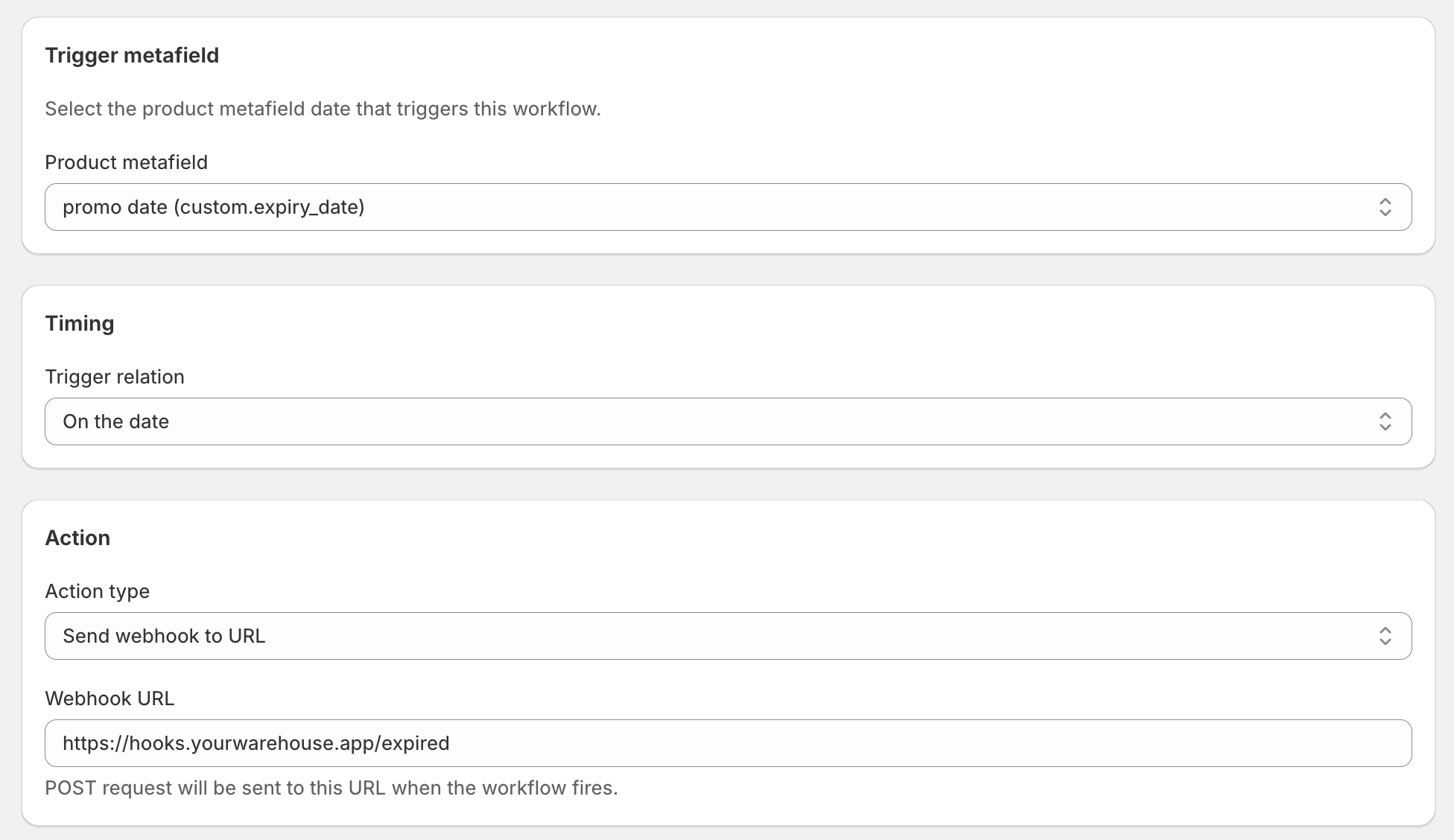
That workflow closes the gap. The instant a product's expiry_date passes, your warehouse endpoint gets the call, and the product never makes it to the packing bench.
What's actually in the payload?
Every DateCue webhook sends a small JSON body describing the product and the date that fired it. There are six fields: the Shopify product ID, the product title, the product handle, the date metafield value, a unique execution ID, and the action type. The body stays deliberately small so the receiver can do the heavy lifting. Here's exactly what arrives:
{
  "shopifyProductId": "gid://shopify/Product/7821934592010",
  "productTitle": "Vitamin D3 + K2 Drops",
  "productHandle": "vitamin-d3-k2-drops",
  "metafieldValue": "2026-06-11",
  "executionId": "clx7y2a9b0001",
  "actionType": "WEBHOOK"
}
Six fields, and every one earns its place. The shopifyProductId lets the other system look the product up in full if it needs more than the title. The metafieldValue is the actual date that fired, handy for logging or for double-checking the timing. The executionId is unique per fire, so if you want to guard against processing the same event twice, that's your idempotency key. And actionType tells the receiver this came from a DateCue webhook action rather than anything else.
The request goes out with a Content-Type of application/json and a User-Agent of DateCue/1.0, in case you want to filter on either. DateCue waits up to ten seconds for your endpoint to answer, then records the result in the execution log.
Proving the call is really from you
Here's the question any decent developer asks the second you mention an inbound webhook: how does my server know this isn't some stranger posting fake "expired product" events at my URL all day? Fair question. The answer is a shared secret.
When you set up the webhook action, you can add a signing secret. From then on, DateCue signs every request body with HMAC SHA-256 using that secret, the same verification approach Shopify uses for its own webhooks, and drops the result into an X-DateCue-Signature header. Your endpoint does the same calculation with the same secret and compares the two. Match means the request is genuine and nobody tampered with the body in transit. No match means bin it.
// Node, on your receiving endpoint
import { createHmac, timingSafeEqual } from "node:crypto";

const expected = createHmac("sha256", YOUR_SECRET)
  .update(rawRequestBody)
  .digest("hex");

const sent = req.headers["x-datecue-signature"];
const ok = sent && timingSafeEqual(
  Buffer.from(expected), Buffer.from(sent),
);
if (!ok) return res.status(401).end();
The secret is optional. Skip it and the webhook still fires, just without a signature, which is fine for low-stakes things like a Slack ping. For anything that changes inventory, money, or fulfilment, use the secret. It costs you one field and buys you certainty.
One more guard worth knowing about: DateCue won't post to private or internal addresses. If a URL resolves to localhost, a 10.x address, a 192.168 address, or any of the usual internal ranges, the request is refused before it's sent. That stops the webhook from being turned into a way to poke around inside a network. Public endpoints only.
Where can you point it?
This is where one feature turns into a hundred. DateCue posts JSON to any public URL, and much of the modern tooling world is, at heart, a URL that catches JSON. Point it at a no-code automation platform, a chat tool, a spreadsheet, or your own server, and each catches the same payload and decides what happens next. So:
- Zapier. Start a Zap with a Catch Hook, paste its URL into DateCue, and now a product date can kick off any of Zapier's thousands of downstream actions. Add a row, send an SMS, create a task, update a CRM.
- Make or n8n. Same idea, more control, friendlier pricing if you're running a lot of volume. Point a webhook module at DateCue and build the scenario visually from there.
- Slack. Slack's incoming webhooks take a POST and turn it into a message. Wire it up and your merchandising channel announces every drop and every expiry on its own.
- Google Sheets. Run it through a quick automation and you've got a permanent, exportable log of every date-driven action your store has ever taken. Auditors love a spreadsheet.
- Your own systems. An ERP, a warehouse platform, a custom microservice, a back-in-stock notifier. If it can accept a POST, it can listen for your product dates.
The warehouse example is just one shape of this. Swap the endpoint and the same mechanism announces a launch in Slack, restarts a Klaviyo flow when a product comes back in stock, or files a row in a compliance log the second a regulated item is pulled. One date, one call, and suddenly every system you own can be in on the secret.
This is the primitive the rest builds on
I've written before about why Shopify Flow can't compare a metafield date to today. The webhook action is the next chapter. Once DateCue can notice "this date is due," sending an email or flipping a status is the easy part. A webhook lets that same moment ripple outward to tools Shopify has never heard of.
And because DateCue lets you stack several workflows on a single date, the webhook doesn't have to work alone. The day a product expires, you might draft it on the storefront, tag it for your records, email your buyer, and fire a webhook to the warehouse, all hanging off the one expiry_date metafield. Each is its own little workflow. Together they make sure nobody, human or machine, is the last to find out.
A note on which plan this lives in
Being straight with you: the webhook action is a Scale feature, at $19 a month. The other four actions, changing status, adding a tag, removing a tag, and emailing your team, run on every plan, including the free one. Webhooks sit at the top because they reach outside Shopify entirely.
Every paid plan includes a 14-day trial, so you can build the whole thing, fire a real webhook at a real endpoint, and watch it land before you decide it's worth keeping. If it isn't, you've lost nothing but an afternoon. If it is, you've closed the gap between a date passing in Shopify and the rest of your systems finding out.
Frequently asked questions
How is this different from Shopify's built-in webhooks?
Shopify's webhooks fire on events: an order is paid, inventory changes, a product is created or updated. None of them fire because a date you set on a product has arrived. A products/update webhook only fires when a field actually changes, not when a future date you saved months ago quietly comes due. DateCue watches the date itself and fires a webhook the minute it passes.
What's inside the webhook payload DateCue sends?
A small JSON body with the Shopify product ID, the product title, the product handle, the date metafield value that triggered the action, a unique execution ID, and the action type. It's posted with a Content-Type of application/json and a DateCue/1.0 user agent. That's enough for the receiving system to look the product up and decide what to do next.
How do I confirm a request really came from DateCue?
Add a signing secret to the webhook action. DateCue then signs the request body with HMAC SHA-256 and sends the signature in an X-DateCue-Signature header. Your endpoint recomputes the HMAC using the same secret and compares. If they match, the request is genuine and untampered. If you skip the secret, the webhook still fires, just unsigned.
Which DateCue plan includes webhooks?
Webhooks are part of the Scale plan ($19/month, rising to $29 after launch). The other four actions (change status, add tag, remove tag, email your team) are available on every plan, including the free one. All paid plans come with a 14-day free trial, so you can wire up a webhook and test it end to end before you commit.
Can I point the webhook at Zapier, Make, n8n, or Slack?
Yes. Anything that gives you a public URL to receive a POST will work: a Zapier Catch Hook, a Make or n8n webhook module, a Slack incoming webhook, or your own server endpoint. DateCue just posts JSON to the address you paste in. What happens after that is up to the tool on the other end.
What happens if my endpoint is down when the webhook fires?
If your endpoint returns an error or doesn't respond, DateCue treats the delivery as failed and retries it with a backing-off delay, the same retry behaviour every action gets. A short outage on your side won't lose the event. You'll also see the failure in the execution log with the status code that came back.
Can the webhook reach a localhost or internal URL?
No, and that's deliberate. DateCue blocks URLs that resolve to private or internal addresses (localhost, 10.x, 192.168.x, link-local, and so on) to prevent the webhook being used to reach inside a network. Point it at a public endpoint. If you need to test locally, use a tunnelling service that gives you a public URL.

Matt Burrell
Founder of Ripen Studio. I build DateCue, and I spend a lot of my week talking to merchants about the small date-automation gaps that Shopify leaves open. More about Matt.
Let your product dates talk to everything else.
Webhooks are on the Scale plan, with a 14-day trial. Build it, fire a real one, and see it land before you pay a cent.
Install free on ShopifyStart free: 100 cues/month. Upgrade to Scale when you're ready to wire in webhooks.