
Connect Shopify Product Dates to Zapier (No Code)

You're already using Zapier for your Shopify store. Orders land, rows get logged, Slack lights up, emails go out. Naturally you want the same for your product dates: launch date arrives and marketing sends; expiry date passes and the product comes down. Right now, if nothing is set up, someone has to notice, someone has to act, and that someone is you, at whatever hour the date happens to fall. This post explains why Zapier can't start from a Shopify product date on its own, and how to bridge that gap in four steps with no code required.
The gap in Shopify's Zapier integration
Shopify's Zapier integration doesn't fire on product dates because it has no way to watch for them. The Shopify triggers available in Zapier fire on events: a product is created, updated, or deleted; an order is paid; inventory drops. None of them fire because a date you stored in a product metafield has quietly become today. There is no "launch date arrived" trigger, no "expiry date passed" trigger. Not on Zapier's side, and not natively in Shopify either.
This catches a lot of merchants mid-build. The date is set in the product metafield. The Zap is ready to go. The trigger they need simply doesn't appear in the list, because Shopify's Zapier integration is event-driven. June 15 doesn't announce itself when it arrives. It just becomes today, and nothing in Shopify notices unless something is actively watching the clock.
Does Shopify Flow solve this?
Shopify Flow can connect to Zapier through an external-action step, which means Flow could theoretically kick off a Zap. The problem is Flow itself can't reliably fire based on a date stored in a product metafield. Flow is event-driven: it reacts to things that happen in your store, like a product being updated or an order being created, and it wasn't designed to scan your catalogue and find products whose dates match today.
There's a Scheduled Time trigger in Flow that runs on a repeating timer. It can theoretically query products, but you'd still have to build the date-comparison logic yourself using a Get Data step and condition blocks that don't support native date arithmetic. For a small catalogue it's possible to cobble together, but it doesn't scale cleanly and it won't catch products that already existed in your store when you turned the workflow on. You'd be rebuilding, from scratch, what a date-polling tool does natively.
How DateCue bridges the gap
DateCue checks every tracked product every minute against its date metafields. When a date arrives, it fires the action you configured: change the product status, add or remove a tag, send a staff email, or fire a webhook to any URL you choose. That last option is the bridge to Zapier. Zapier has a trigger called Catch Hook (part of its Webhooks by Zapier app) that gives you a public URL designed to receive an HTTP POST. DateCue fires the POST when the date is due; Zapier catches it and starts the Zap.
I've covered how the DateCue webhook action works in detail for those who want the full picture. The short version: DateCue is the part that watches for the date and makes the call. Zapier is the part that decides what to do once it receives that call.
💡 The model: DateCue watches your metafield, fires a webhook when the date is due. Zapier catches that webhook via a Catch Hook and routes it to any of its 7,000+ connected apps. One product date can now reach your whole stack.
Setting it up in four steps
You'll need a paid Zapier account (the Catch Hook trigger requires a Zapier paid plan) and a DateCue Scale account for the webhook action. Everything else is copy-pasting a URL. No code, no developer.
Step 1: Create a Catch Hook Zap in Zapier
In Zapier, create a new Zap. For the trigger app, search for Webhooks by Zapier and select Catch Hook as the event. Skip the "Pick off a Child Key" field, you won't need it. Zapier generates a unique webhook URL that looks something like https://hooks.zapier.com/hooks/catch/12345678/abcdefg/. Copy it. That URL is where DateCue will send its payload.
Step 2: Configure the DateCue webhook action
In DateCue, create a new workflow. Choose the metafield holding the date (for example, custom.expiry_date or custom.launch_date). Set the timing: on the date, a certain number of days before, or a certain number of days after. Choose Fire webhook as the action, and paste the Zapier URL you copied. Save the workflow.
Timing: On the date
Action: Fire webhook → https://hooks.zapier.com/hooks/catch/12345678/abcdefg/
Filter: Status = Active
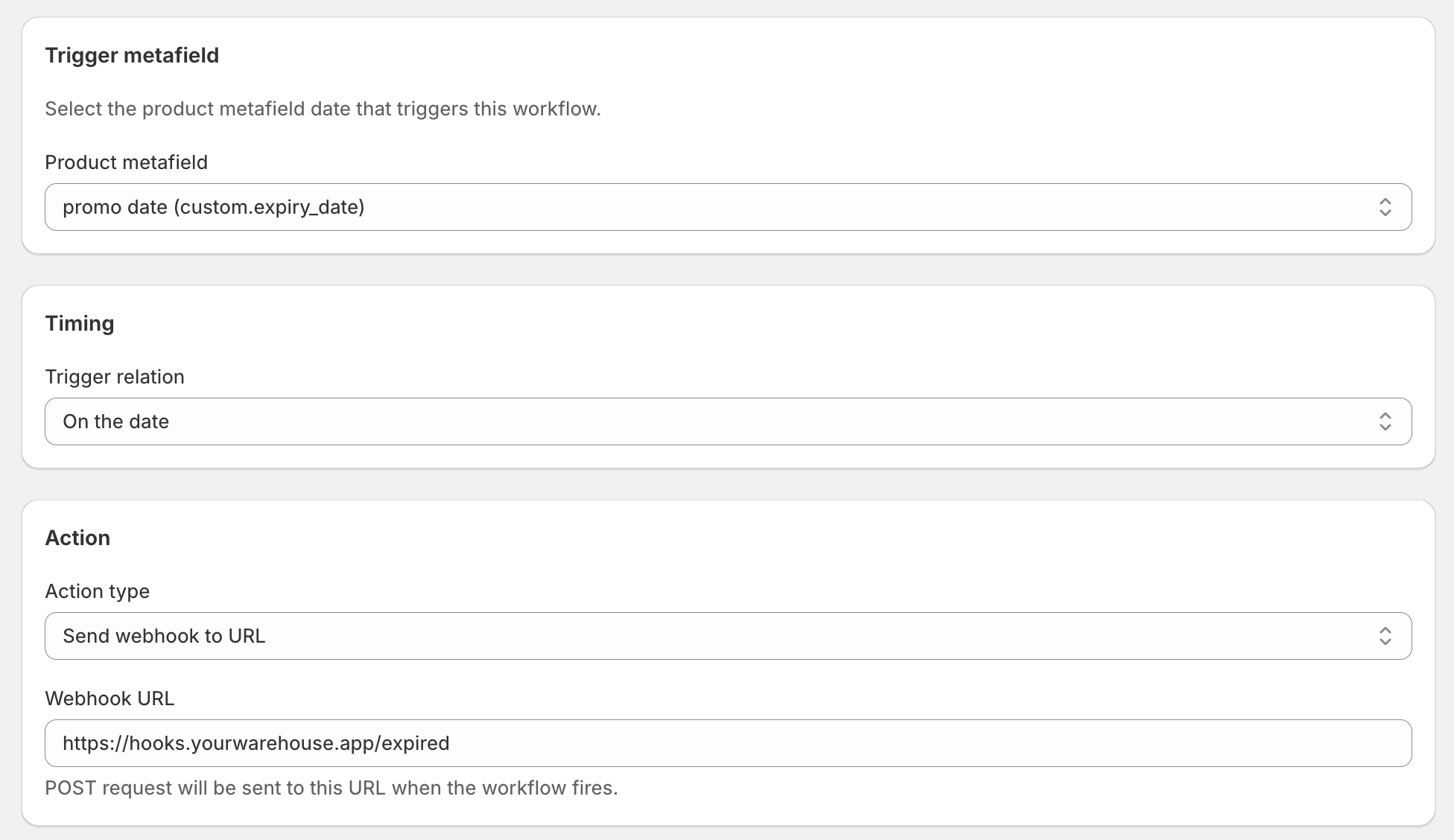
Step 3: Send a test payload
DateCue lets you fire a test webhook from the workflow editor. Use that button. Back in Zapier, click Test trigger in the trigger step, and Zapier will pick up the sample data DateCue just sent. Once it does, Zapier knows the shape of the payload and you can reference any of its fields in the downstream steps: the product title, the Shopify product ID, the metafield date, whatever you need.
Step 4: Build the rest of the Zap
From here it's standard Zapier. Add the action steps you need. DateCue's payload gives you six fields to work with: shopifyProductId, productTitle, productHandle, metafieldValue (the actual date that fired), executionId, and actionType. Enough to identify the product, route it, and pass it to any downstream app.
Three things you can do with Zapier once it's listening
The downstream is open once the Catch Hook is wired. Here are three patterns that make sense for different kinds of stores, each one turning the same date trigger into a different kind of value.
Log every action to a Google Sheets audit trail
Add a Google Sheets action: create a spreadsheet row each time the hook fires. Each row captures the product name, its Shopify ID, the date that triggered the action, and a timestamp. If you're selling in a regulated category, food, cosmetics, supplements, this gives you a permanent exportable record of every product that was acted on and when. Not just in DateCue's execution log, but in a shared spreadsheet anyone on your team can open.
This pairs well with DateCue's built-in status-change and email actions, for example when you're running a full compliance workflow: DateCue archives the product on the Shopify side, the Zap writes the event to the sheet, and your buyer has a row to refer to before they even check the admin.
Post to a Slack channel
Add a Slack action and format a message using the fields DateCue sent. When a product's launch date arrives, your #marketing channel gets a ping: "Vitamin C Serum is live. Launch date: 2026-06-13." When an expiry date passes, #merchandising sees: "Retinol Night Cream has been moved to draft." No one had to watch the calendar, no one had to remember to post. The channel stays current automatically.
For stores that are already running DateCue's built-in staff email action on the same date, the Slack ping is additive. The email goes to whoever needs the formal alert; Slack gets the real-time channel post. Both fire from the same expiry_date metafield, through separate DateCue workflows, on the same day.
Trigger a Klaviyo flow or update a CRM record
Say you sell a product with a known restock date and you want to send a "back in stock" email to everyone who asked. Set the restock date in a product metafield. When it arrives, DateCue fires the webhook, Zapier catches it, and downstream you start a Klaviyo flow for your waitlist segment or update a field in your CRM. The whole chain runs without a person in the loop: the product goes live, the customer email goes out, the CRM reflects the change.
Stacking more actions on the same date
Because DateCue runs each workflow independently, you're not locked to one action per date. If you want a product's expiry date to trigger three things at once, you set up three workflows, all pointing at the same metafield, all firing on the same day. One drafts the product. One fires the webhook to Zapier. One emails your buyer. They run as separate jobs, usually within the same minute.
The same works in reverse, across two dates. Set a sale_start metafield and a sale_end metafield on each sale product. One DateCue workflow adds the "on-sale" tag when sale_start arrives and fires a webhook to Zapier to log the event in Sheets. A second workflow removes the tag when sale_end passes and fires a separate webhook to post the cleanup to Slack. The sale opens, runs, and closes, all without anyone touching it.
For more on how to design multi-workflow setups, the webhook action overview covers stacking workflows on a single date in detail.
What this costs
Being direct: the webhook action in DateCue is part of the Scale plan at $19 a month. The other four actions (change status, add tag, remove tag, send a staff email to your team) run on every plan, including the free one. If the Zapier integration is the main thing you're after, Scale is the plan.
Zapier's side needs a paid plan too, since the Catch Hook trigger is a premium feature. If you're already paying for Zapier, you're just adding the missing trigger. If you're not, it's worth checking whether the downstream actions you need are on Zapier's starter tier before committing to both subscriptions. For some use cases, DateCue's built-in email action covers the notification side without Zapier at all, and that runs on every plan.
Every DateCue paid plan comes with a 14-day free trial. You can wire up the full integration, fire a real webhook at your Catch Hook, and watch the Zap run before you decide it's worth keeping.
Frequently asked questions
Can Zapier read Shopify product metafields?
Zapier's Shopify integration can retrieve some product data, but it does not natively fire a trigger when a date stored in a product metafield arrives. The Shopify triggers in Zapier are all event-based: a product is created, an order is paid, inventory changes. There is no trigger for "the date in this metafield is today." DateCue fills that gap by watching the metafield and firing a webhook when the date arrives, which Zapier can then catch.
How do I trigger a Zapier workflow when a Shopify product date passes?
Use DateCue's webhook action pointed at a Zapier Catch Hook URL. DateCue checks every tracked product every minute against its date metafields. When a date arrives, it fires an HTTP POST to the Catch Hook URL, which starts the Zap. From there, Zapier handles everything downstream: log a row, post to Slack, update a CRM, trigger a Klaviyo flow, whatever you need.
Does Shopify Flow support date metafield conditions?
Not cleanly. Shopify Flow is event-driven: it reacts to things that happen (a product is updated, an order arrives). It cannot poll your catalogue and ask "is today this product's launch date?" The Scheduled Time trigger exists but requires you to build the date-comparison logic yourself, and it does not backfill products that existed before you turned the workflow on.
What information does Zapier receive from DateCue?
DateCue sends a small JSON body with six fields: the Shopify product ID, the product title, the product handle, the date metafield value that triggered the action, a unique execution ID, and the action type. That's enough for Zapier to identify the product and route the data to any downstream app, whether that's Slack, Google Sheets, a CRM, or something else.
Do I need a paid Zapier plan for a Catch Hook?
Yes. Zapier's Webhooks by Zapier Catch Hook requires a paid Zapier plan. Free-tier Zaps can only use pre-built app triggers, not custom webhook URLs. Check Zapier's pricing page for the current plan tier that includes webhook triggers.
Which DateCue plan includes the webhook action?
The webhook action is part of the Scale plan at $19 per month. All other actions (change status, add tag, remove tag, email your team) are available on every plan, including free. The Scale plan comes with a 14-day free trial, so you can wire up the full Zapier integration and test it end to end before committing.

Matt Burrell
Founder of Ripen Studio. I build DateCue, and I spend a lot of my week talking to merchants about the small date-automation gaps that Shopify leaves open. More about Matt.
Give your product dates somewhere to go.
DateCue watches your metafield dates and fires the webhook the moment they're due. Wire it to Zapier and that one date can reach any app in your stack.
Install free on ShopifyWebhook action on Scale ($19/mo). Free plan: 100 cues/month. All paid plans include a 14-day trial.